Netzwerke testen
Wenn du mit einem Kunden mitten in der Fehlersuche steckst, willst du Werkzeuge zur Hand haben, die ein paar Tests für dich übernehmen.

Dieser Beitrag ist von 2017. Er bleibt online, weil er nach wie vor nachgefragt wird, beschreibt aber einen Produktstand von damals.
Wenn du mit einem Kunden mitten in der Fehlersuche steckst, willst du Werkzeuge zur Hand haben, die ein paar Tests für dich übernehmen. Bei mir kam es ziemlich oft vor, dass Netze zwar verbunden waren, aber nicht über den Host hinaus kommunizieren konnten. In einer HPE Blade Enclosure Infrastruktur ist das meistens ein vergessener VLAN Tag in den Server Profiles.
Um das schnell auszuschliessen, habe ich an einem Script gearbeitet, mit dem du jedes Netz in deiner Umgebung testest.
Das ursprüngliche Script stammt von https://virtualdatacave.com und zielte zunächst nur auf Distributed Switches. Jemand in der VMware Code Community hat darum gebeten, es so zu erweitern, dass es auch Standard Switches unterstützt. Ich dachte: angenommen.
Die Portierung auf Standard Switches war anspruchsvoll. Weil Standard Switches zum Host gehören, musste ein grosser Teil der Logik geändert werden, damit sich die Netze gleich testen lassen wie bei Distributed Switches.
Voraussetzungen
- Eine Windows-VM mit deaktivierter UAC, die in der zu testenden Umgebung läuft
- Eine CSV-Datei mit den Informationen zu den zu testenden Netzen
CSV: die Netzwerkkarte
Deine CSV sollte etwa so aussehen:

Achte darauf, dass sie wirklich «comma separated» ist, denn Excel speichert CSV gerne mit Semikolon statt Komma.
PortGroup: der Name der zu testenden Portgroup
SourceIP: die IP, die deine Test-VM in dieser Portgroup bekommt. Achte darauf, dass sie frei ist, doppelte IPs will niemand
GatewayIP: das Gateway des zu testenden Netzes
SubnetMask: die Subnetzmaske des zu testenden Netzes
TestIP: welche IP beim Test in dieser Portgroup angepingt werden soll. Du kannst natürlich immer dieselbe nehmen, wenn alle deine Netze geroutet sind, oder wie im Beispiel eine subnetzinterne
Update: Dieses Script liegt inzwischen auf GitHub.
Das Script
param
(
	[Parameter(Mandatory=$true)]
	[string]$clusterName,
	[Parameter(Mandatory=$true)]
	[string]$dvsName,
	[Parameter(Mandatory=$true)]
	[boolean]$isStandard,
	[Parameter(Mandatory=$true)]
	[pscredential]$creds,
	[Parameter(Mandatory=$true)]
	[string]$vmName,
	[Parameter(Mandatory=$true)]
	[string]$csvFile,
	[int]$timesToPing = 1,
	[int]$pingReplyCountThreshold = 1,
	[Parameter(Mandatory=$true)]
	[string]$resultFile
)

#Setup

# Configure internal variables
$trustVMInvokeable = $false #this is to speed development only.  Set to false.
$testResults = @()
$testPortGroupName = "VirtualFrog"
$data = import-csv $csvFile
$cluster = get-cluster $clusterName
$vm = get-vm $vmName

if ($isStandard -eq $false) {
    $dvs = get-vdswitch $dvsName
    $originalVMPortGroup = ($vm | get-Networkadapter)[0].networkname
	if ($originalVMPortGroup -eq "") {
		$originalVMPortGroup = ($vm | get-virtualswitch -name $dvsName |get-virtualportgroup)[0]
		write-host -Foregroundcolor:red "Adding a fantasy Name to $originalVMPortGroup"
	}
} else {
    $originalVMPortGroup = ($vm | get-Networkadapter)[0].networkname
    $temporaryVar = ($vm |get-networkadapter)[0].NetworkName
	if ($originalVMPortGroup -eq "") {
		$originalVMPortGroup = ($vm |get-vmhost |get-virtualswitch -name $dvsName |get-virtualportgroup -Standard:$true)[0]
		write-host -Foregroundcolor:red "Adding a fantasy Name to $originalVMPortGroup"
	}
}
#We'll use this later to reset the VM back to its original network location if it's empty for some reason wel'll populate it with the first portgroup

#Test if Invoke-VMScript works
if(-not $trustVMInvokeable) {
	if (-not (Invoke-VMScript -ScriptText "echo test" -VM $vm -GuestCredential $creds).ScriptOutput -eq "test") {
		write-output "Unable to run scripts on test VM guest OS!"
		return 1
	}
}

#Define Test Functions
function TestPing($ip, $count, $mtuTest) {
	if($mtuTest) {
		$count = 4 #Less pings for MTU test
		$pingReplyCountThreshold = 3 #Require 3 responses for success on MTU test.  Note this scope is local to function and will not impact variable for future run.
		$script = "ping -f -l 8972 -n $count $ip"
	} else {
		$script =  "ping -n $count $ip"
	}

	write-host "Script to run: $script"
	$result = Invoke-VMScript -ScriptText $script -VM $vm -GuestCredential $creds

	#parse the output for the "received packets" number
	$rxcount = (( $result.ScriptOutput | ? { $_.indexof("Packets") -gt -1 } ).Split(',') | ? { $_.indexof("Received") -gt -1 }).split('=')[1].trim()

	#if we received enough ping replies, consider this a success
	$success = ([int]$rxcount -gt $pingReplyCountThreshold)

	#however there is one condition where this will be a false positive... gateway reachable but destination not responding
	if ( $result.ScriptOutput | ? { $_.indexof("host unreach") -gt -1 } ) {
		$success = $false
		$rxcount = 0;
	}

	write-host "Full results of ping test..."
	write-host $result.ScriptOutput

	return @($success, $count, $rxcount);
}

function SetGuestIP($ip, $subnet, $gw) {
  $script = @"
	`$iface = (gwmi win32_networkadapter -filter "netconnectionstatus = 2" | select -First 1).interfaceindex
	netsh interface ip set address name=`$iface static $ip $subnet $gw
	netsh interface ipv4 set subinterface `$iface mtu=9000 store=active
"@
  write-host "Script to run: " + $script
  return (Invoke-VMScript -ScriptText $script -VM $vm -GuestCredential $creds)
}

#Tests
# Per Port Group Tests  (Test each port group)

$vmhost = $vm.vmhost
if ($isStandard -eq $false)
{
	foreach($item in $data) {
		if($testPortGroup = $dvs | get-vdportgroup -name $item.PortGroup) {
			($vm | get-Networkadapter)[0] | Set-NetworkAdapter -Portgroup $testPortGroup -confirm:$false
			if( SetGuestIP $item.SourceIP $item.SubnetMask $item.GatewayIP ) {
				echo ("Set Guest IP to " + $item.SourceIP)

				#Run normal ping test
				$pingTestResult = TestPing $item.TestIP $timesToPing $false
				#Add to results
				$thisTest = [ordered]@{"VM" = $vm.name; "TimeStamp" = (Get-Date -f s); "Host" = $vmhost.name;}
				$thisTest["Host"] = $vmhost.name
				$thisTest["PortGroupName"] = $testPortGroup.name
				$thisTest["VlanID"] = $testPortGroup.vlanconfiguration.vlanid
				$thisTest["SourceIP"] = $item.SourceIP
				$thisTest["DestinationIP"] = $item.TestIP
				$thisTest["Result"] = $pingTestResult[0].tostring()
				$thisTest["TxCount"] = $pingTestResult[1].tostring()
				$thisTest["RxCount"] = $pingTestResult[2].tostring()
				$thisTest["JumboFramesTest"] = ""
				$thisTest["Uplink"] = $thisUplink

				$testResults += new-object -typename psobject -Property $thisTest

				#DISABLED JUMBO FRAMES TEST!
				if($false) {
					#Run jumbo frames test
					$pingTestResult = TestPing $item.TestIP $timesToPing $true
					#Add to results
					$thisTest = [ordered]@{"VM" = $vm.name; "TimeStamp" = (Get-Date -f s); "Host" = $vmhost.name;}
					$thisTest["Host"] = $vmhost.name
					$thisTest["PortGroupName"] = $testPortGroup.name
					$thisTest["VlanID"] = $testPortGroup.vlanconfiguration.vlanid
					$thisTest["SourceIP"] = $item.SourceIP
					$thisTest["DestinationIP"] = $item.TestIP
					$thisTest["Result"] = $pingTestResult[0].tostring()
					$thisTest["TxCount"] = $pingTestResult[1].tostring()
					$thisTest["RxCount"] = $pingTestResult[2].tostring()
					$thisTest["JumboFramesTest"] = ""
					$thisTest["Uplink"] = $thisUplink

					$testResults += new-object -typename psobject -Property $thisTest
				}

			} else {
				$thisTest = [ordered]@{"VM" = $vm.name; "TimeStamp" = (Get-Date -f s); "Host" = $vmhost.name;}
				$thisTest["PortGroupName"] = $testPortGroup.name
				$thisTest["VlanID"] = $testPortGroup.vlanconfiguration.vlanid
				$thisTest["SourceIP"] = $item.SourceIP
				$thisTest["DestinationIP"] = $item.GatewayIP
				$thisTest["Result"] = "false - error setting guest IP"
				$testResults += new-object -typename psobject -Property $thisTest
			}
		} else {
			$thisTest = [ordered]@{"VM" = $vm.name; "TimeStamp" = (Get-Date -f s); "Host" = $vmhost.name;}
			$thisTest["PortGroupName"] = $item.PortGroup
			$thisTest["Result"] = "false - could not find port group"
			$testResults += new-object -typename psobject -Property $thisTest
		}
	}
}
else {
    #This is for a Standard Switch
	foreach($item in $data) {
		$dvs = $vm |get-vmhost | get-virtualswitch -name $dvsName
		if($testPortGroup = $dvs | get-virtualportgroup -name $item.PortGroup) {
			($vm | get-Networkadapter)[0] | Set-NetworkAdapter -Portgroup $testPortGroup -confirm:$false
			if( SetGuestIP $item.SourceIP $item.SubnetMask $item.GatewayIP ) {
				echo ("Set Guest IP to " + $item.SourceIP)

				#Run normal ping test
				$pingTestResult = TestPing $item.TestIP $timesToPing $false
				#Add to results
				$thisTest = [ordered]@{"VM" = $vm.name; "TimeStamp" = (Get-Date -f s); "Host" = $vmhost.name;}
				$thisTest["Host"] = $vmhost.name
				$thisTest["PortGroupName"] = $testPortGroup.name
				$thisTest["VlanID"] = $testPortGroup.vlanid
				$thisTest["SourceIP"] = $item.SourceIP
				$thisTest["DestinationIP"] = $item.TestIP
				$thisTest["Result"] = $pingTestResult[0].tostring()
				$thisTest["TxCount"] = $pingTestResult[1].tostring()
				$thisTest["RxCount"] = $pingTestResult[2].tostring()
				$thisTest["JumboFramesTest"] = ""
				$thisTest["Uplink"] = $thisUplink

				$testResults += new-object -typename psobject -Property $thisTest

				#DISABLED JUMBO FRAMES TEST!
				if($false) {
					#Run jumbo frames test
					$pingTestResult = TestPing $item.TestIP $timesToPing $true
					#Add to results
					$thisTest = [ordered]@{"VM" = $vm.name; "TimeStamp" = (Get-Date -f s); "Host" = $vmhost.name;}
					$thisTest["Host"] = $vmhost.name
					$thisTest["PortGroupName"] = $testPortGroup.name
					$thisTest["VlanID"] = $testPortGroup.vlanid
					$thisTest["SourceIP"] = $item.SourceIP
					$thisTest["DestinationIP"] = $item.TestIP
					$thisTest["Result"] = $pingTestResult[0].tostring()
					$thisTest["TxCount"] = $pingTestResult[1].tostring()
					$thisTest["RxCount"] = $pingTestResult[2].tostring()
					$thisTest["JumboFramesTest"] = ""
					$thisTest["Uplink"] = $thisUplink

					$testResults += new-object -typename psobject -Property $thisTest
				}

			} else {
				$thisTest = [ordered]@{"VM" = $vm.name; "TimeStamp" = (Get-Date -f s); "Host" = $vmhost.name;}
				$thisTest["PortGroupName"] = $testPortGroup.name
				$thisTest["VlanID"] = $testPortGroup.vlanid
				$thisTest["SourceIP"] = $item.SourceIP
				$thisTest["DestinationIP"] = $item.GatewayIP
				$thisTest["Result"] = "false - error setting guest IP"
				$testResults += new-object -typename psobject -Property $thisTest
			}
		} else {
			$thisTest = [ordered]@{"VM" = $vm.name; "TimeStamp" = (Get-Date -f s); "Host" = $vmhost.name;}
			$thisTest["PortGroupName"] = $item.PortGroup
			$thisTest["Result"] = "false - could not find port group"
			$testResults += new-object -typename psobject -Property $thisTest
		}
	}
}

# Per Host Tests (Test Each Link for Each VLAN ID on each host)
$testPortGroup = $null

if ($isStandard -eq $false)
{

	($testPortGroup = new-vdportgroup $dvs -Name $testPortGroupName -ErrorAction silentlyContinue) -or ($testPortGroup = $dvs | get-vdportgroup -Name $testPortGroupName)
	($vm | get-Networkadapter)[0] | Set-NetworkAdapter -Portgroup $testPortGroup -confirm:$false

	$cluster | get-vmhost | ? {$_.ConnectionState -match "connected" } | foreach {
		$vmhost = $_
		#Migrate VM to new host
		if(Move-VM -VM $vm -Destination $vmhost) {

			foreach($item in $data) {
				#Configure test port group VLAN ID for this particular VLAN test, or clear VLAN ID if none exists
				$myVlanId = $null
				$myVlanId = (get-vdportgroup -name $item.PortGroup).VlanConfiguration.Vlanid
				if($myVlanId) {
					$testPortGroup = $testPortGroup | Set-VDVlanConfiguration -Vlanid $myVlanId
				} else {
					$testPortGroup = $testPortGroup | Set-VDVlanConfiguration -DisableVlan
				}

				if( SetGuestIP $item.SourceIP $item.SubnetMask $item.GatewayIP ) {
					echo ("Set Guest IP to " + $item.SourceIP)

					#Run test on each uplink individually
					$uplinkset = ( ($testPortGroup | Get-VDUplinkTeamingPolicy).ActiveUplinkPort + ($testPortGroup | Get-VDUplinkTeamingPolicy).StandbyUplinkPort ) | sort
					foreach($thisUplink in $uplinkset) {
						#Disable all uplinks from the test portgroup
						$testPortGroup | Get-VDUplinkTeamingPolicy | Set-VDUplinkTeamingPolicy -UnusedUplinkPort $uplinkset
						#Enable  only this uplink for the test portgroup
						$testPortGroup | Get-VDUplinkTeamingPolicy | Set-VDUplinkTeamingPolicy -ActiveUplinkPort $thisUplink

						#Run normal ping test
						$pingTestResult = TestPing $item.TestIP $timesToPing $false
						#Add to results
						$thisTest = [ordered]@{"VM" = $vm.name; "TimeStamp" = (Get-Date -f s); "Host" = $vmhost.name;}
						$thisTest["Host"] = $vmhost.name
						$thisTest["PortGroupName"] = $testPortGroup.name
						$thisTest["VlanID"] = $testPortGroup.vlanconfiguration.vlanid
						$thisTest["SourceIP"] = $item.SourceIP
						$thisTest["DestinationIP"] = $item.TestIP
						$thisTest["Result"] = $pingTestResult[0].tostring()
						$thisTest["TxCount"] = $pingTestResult[1].tostring()
						$thisTest["RxCount"] = $pingTestResult[2].tostring()
						$thisTest["JumboFramesTest"] = ""
						$thisTest["Uplink"] = $thisUplink

						$testResults += new-object -typename psobject -Property $thisTest

						#DISABLED JUMBO FRAMES TEST!
						if($false) {
							#Run jumbo frames test
							$pingTestResult = TestPing $item.TestIP $timesToPing $true
							#Add to results
							$thisTest = [ordered]@{"VM" = $vm.name; "TimeStamp" = (Get-Date -f s); "Host" = $vmhost.name;}
							$thisTest["Host"] = $vmhost.name
							$thisTest["PortGroupName"] = $testPortGroup.name
							$thisTest["VlanID"] = $testPortGroup.vlanconfiguration.vlanid
							$thisTest["SourceIP"] = $item.SourceIP
							$thisTest["DestinationIP"] = $item.TestIP
							$thisTest["Result"] = $pingTestResult[0].tostring()
							$thisTest["TxCount"] = $pingTestResult[1].tostring()
							$thisTest["RxCount"] = $pingTestResult[2].tostring()
							$thisTest["JumboFramesTest"] = ""
							$thisTest["Uplink"] = $thisUplink

							$testResults += new-object -typename psobject -Property $thisTest
						}
					}

					$testPortGroup | Get-VDUplinkTeamingPolicy | Set-VDUplinkTeamingPolicy -ActiveUplinkPort ($uplinkset | sort)

				} else {
					$thisTest = [ordered]@{"VM" = $vm.name; "TimeStamp" = (Get-Date -f s); "Host" = $vmhost.name;}
					$thisTest["PortGroupName"] = $testPortGroup.name
					$thisTest["VlanID"] = $testPortGroup.vlanconfiguration.vlanid
					$thisTest["SourceIP"] = $item.SourceIP
					$thisTest["DestinationIP"] = $item.GatewayIP
					$thisTest["Result"] = "false - error setting guest IP"
					$testResults += new-object -typename psobject -Property $thisTest
				}
			}
		} else {
			$thisTest = [ordered]@{"VM" = $vm.name; "TimeStamp" = (Get-Date -f s); "Host" = $vmhost.name;}
			$thisTest["Result"] = "false - unable to vMotion VM to this host"
			$testResults += new-object -typename psobject -Property $thisTest
		}
	}
}
else {
    #This is for a standard Switch
    $vmhost = $null

    #adding the testPortGroup on all hosts in the cluster
    $cluster | get-vmhost | ? {$_.ConnectionState -match "connected" } | sort | foreach {
		$dvs = get-virtualswitch -Name $dvsName -VMhost $_
    	$dvs | new-virtualportgroup -Name $testPortGroupName -ErrorAction silentlyContinue
    }

    $vmhost = $null
	$cluster | get-vmhost | ? {$_.ConnectionState -match "connected" } | sort | foreach {
		$vmhost = $_
		$dvs = get-virtualswitch -Name $dvsName -VMhost $vmhost
		$testPortGroup = $dvs |get-virtualportgroup -Name $testPortGroupName -VMhost $vmhost -ErrorAction silentlyContinue

		#Migrate VM to new host
		if(Move-VM -VM $vm -Destination $vmhost) {
				write-host -Foregroundcolor:red "Sleeping 5 seconds..."
				start-sleep -seconds 5
				if (($vm | get-Networkadapter)[0] | Set-NetworkAdapter -Portgroup ($dvs |get-virtualportgroup -Name $testPortGroupName -VMhost $vmhost) -confirm:$false -ErrorAction stop)
				{
					write-host -Foregroundcolor:green "Adapter Change successful"
				}else {
				    write-host -Foregroundcolor:red "Cannot change adapter!"
				    #$esxihost = $vm |get-vmhost
				    #$newPortgroup = $esxihost | get-virtualportgroup -Name testPortGroupName -ErrorAction silentlyContinue
				    #if (($vm | get-Networkadapter)[0] | Set-NetworkAdapter -Portgroup ($newPortgroup) -confirm:$false -ErrorAction stop) {
				    #    write-host -Foregroundcolor:green "Adapter Change successful (2nd attempt)"
				    #} else {
				    #    write-host -Foregroundcolor:red "Cannot change Adapter even on 2nd attempt. Exiting script"
				    #    exit 1
				    #}
				}

			foreach($item in $data) {
				#Configure test port group VLAN ID for this particular VLAN test, or clear VLAN ID if none exists
				$myVlanId = $null
				$myVlanId = [int32](get-virtualportgroup -VMhost $vmhost -Standard:$true -name $item.PortGroup).Vlanid
				if($myVlanId) {
					$testPortGroup = $testPortGroup | Set-VirtualPortGroup -Vlanid $myVlanId
				} else {
					$testPortGroup = $testPortGroup | Set-VirtualPortGroup -VlanId 0
				}

				if( SetGuestIP $item.SourceIP $item.SubnetMask $item.GatewayIP ) {
					echo ("Set Guest IP to " + $item.SourceIP)

					#Run test on each uplink individually
					$uplinkset = ( ($testPortGroup | Get-NicTeamingPolicy).ActiveNic + ($testPortGroup |Get-NicTeamingPolicy).StandbyNic ) |sort
					foreach($thisUplink in $uplinkset) {
						#Disable all uplinks from the test portgroup
						$testPortGroup | Get-NicTeamingPolicy | Set-NicTeamingPolicy -MakeNicUnused $uplinkset
						#Enable  only this uplink for the test portgroup
						$testPortGroup | Get-NicTeamingPolicy | Set-NicTeamingPolicy -MakeNicActive $thisUplink

						#Run normal ping test
						$pingTestResult = TestPing $item.TestIP $timesToPing $false
						#Add to results
						$thisTest = [ordered]@{"VM" = $vm.name; "TimeStamp" = (Get-Date -f s); "Host" = $vmhost.name;}
						$thisTest["Host"] = $vmhost.name
						$thisTest["PortGroupName"] = $testPortGroup.name
						$thisTest["VlanID"] = $testPortGroup.vlanid
						$thisTest["SourceIP"] = $item.SourceIP
						$thisTest["DestinationIP"] = $item.TestIP
						$thisTest["Result"] = $pingTestResult[0].tostring()
						$thisTest["TxCount"] = $pingTestResult[1].tostring()
						$thisTest["RxCount"] = $pingTestResult[2].tostring()
						$thisTest["JumboFramesTest"] = ""
						$thisTest["Uplink"] = $thisUplink

						$testResults += new-object -typename psobject -Property $thisTest

						#DISABLED JUMBO FRAMES TEST!
						if($false) {
							#Run jumbo frames test
							$pingTestResult = TestPing $item.TestIP $timesToPing $true
							#Add to results
							$thisTest = [ordered]@{"VM" = $vm.name; "TimeStamp" = (Get-Date -f s); "Host" = $vmhost.name;}
							$thisTest["Host"] = $vmhost.name
							$thisTest["PortGroupName"] = $testPortGroup.name
							$thisTest["VlanID"] = $testPortGroup.vlanid
							$thisTest["SourceIP"] = $item.SourceIP
							$thisTest["DestinationIP"] = $item.TestIP
							$thisTest["Result"] = $pingTestResult[0].tostring()
							$thisTest["TxCount"] = $pingTestResult[1].tostring()
							$thisTest["RxCount"] = $pingTestResult[2].tostring()
							$thisTest["JumboFramesTest"] = ""
							$thisTest["Uplink"] = $thisUplink

							$testResults += new-object -typename psobject -Property $thisTest
						}
					}

					$testPortGroup | Get-NicTeamingPolicy | Set-NicTeamingPolicy -MakeNicActive ($uplinkset | sort)

				} else {
					$thisTest = [ordered]@{"VM" = $vm.name; "TimeStamp" = (Get-Date -f s); "Host" = $vmhost.name;}
					$thisTest["PortGroupName"] = $testPortGroup.name
					$thisTest["VlanID"] = $testPortGroup.vlanid
					$thisTest["SourceIP"] = $item.SourceIP
					$thisTest["DestinationIP"] = $item.GatewayIP
					$thisTest["Result"] = "false - error setting guest IP"
					$testResults += new-object -typename psobject -Property $thisTest
				}
			}
		} else {
			$thisTest = [ordered]@{"VM" = $vm.name; "TimeStamp" = (Get-Date -f s); "Host" = $vmhost.name;}
			$thisTest["Result"] = "false - unable to vMotion VM to this host"
			$testResults += new-object -typename psobject -Property $thisTest
		}
	}
}

#Clean up
if ($isStandard -eq $false)
{
	($vm | get-Networkadapter)[0] | Set-NetworkAdapter -Portgroup (get-vdportgroup $originalVMPortGroup) -confirm:$false
	Remove-VDPortGroup -VDPortGroup $testPortGroup -confirm:$false

} else {
	$tempvm = get-vm $vmName
	$temphost = $tempvm |get-VMhost
	$portGroupToRevertTo = $temphost |get-virtualportgroup -name $temporaryVar -Standard:$true
    ($vm | get-Networkadapter)[0] | Set-NetworkAdapter -Portgroup $portGroupToRevertTo -confirm:$false
    write-host -Foregroundcolor:green "Waiting 5 seconds for $vm to revert back to $temporaryVar"
    start-sleep -seconds 5
    $cluster | get-vmhost | ? {$_.ConnectionState -match "connected" } | foreach {
		$vmhost = $_
		$dvs = $vmhost | get-virtualswitch -Name $dvsName
		$testPortGroup = $dvs | get-virtualportgroup -name $testPortGroupName -Standard:$true -VMhost $vmhost
		remove-virtualportgroup -virtualportgroup $testPortGroup -confirm:$false
	}
}

#Future Test Ideas
#Query driver/firmware for each host's network adapters ?

#Show Results
$testResults | ft
$testResults | Export-CSV -notypeinformation $resultFile
Verwendung
Du kannst das Script auch ohne Parameter starten, dann wirst du nach jedem einzeln gefragt.
- clusterName: Name des Clusters, in dem du deine Netze testen willst
- dvsName: Name des Switch (Distributed oder Standard), den du testen willst
- isStandard: $true oder $false, je nachdem, ob dein Switch ein Standard Switch ($true) oder ein Distributed Switch ($false) ist
- creds: fragt nach den Zugangsdaten, mit denen du Scripts auf deiner Test-VM ausführen kannst, nicht nach den vCenter-Zugangsdaten
- vmName: Name der Windows-Maschine, mit der die Netze getestet werden
- csvFile: Pfad zur map.csv aus den Voraussetzungen
- resultFile: Pfad, unter dem die resultierende CSV gespeichert werden soll
Wenn du es hältst wie ich, übergibst du beim Start alle Argumente, ausser vielleicht creds:
./virtualFrogNetworkTester.ps1 -clusterName VirtualFrog1 -dvsName vSwitch1 -isStandard:$true -vmName networktestingFrogVM -csvFile c:\temp\map.csv -resultFile c:\temp\virtualFrogRocks.csv
Ergebnis
Die resultierende CSV-Datei sieht etwa so aus:
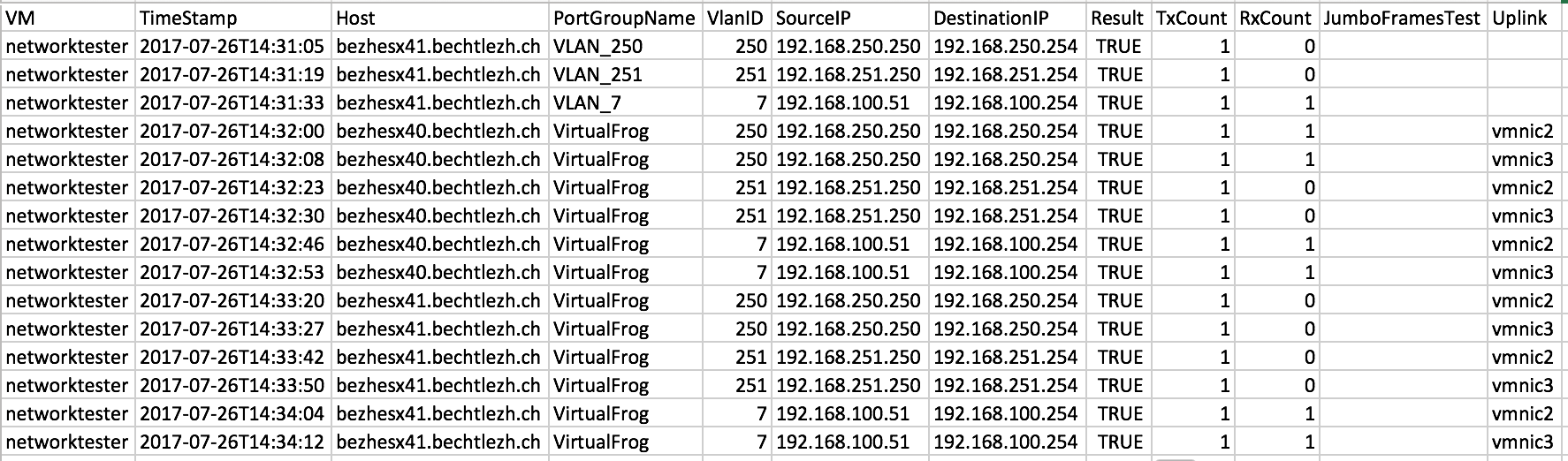
Was sagt dir das? Das Script macht zwei Tests:
- Es hängt die Test-VM an jedes Netz aus deiner map.csv, setzt die IP und pingt das Ziel an
- Danach geht es alle Hosts im Cluster durch, erstellt ein temporäres Netz, setzt die Tags deiner Testnetze und geht dann die Uplinks durch: beide unused, dann einer active, beide unused, der andere active
Nach diesem Test weisst du, ob alle deine Uplinks Verbindung zu allen zugewiesenen Netzen haben, und du kannst sicher sein, dass VMs innerhalb dieser Netze kommunizieren können.
Bekannte Probleme
Eines habe ich nicht gelöst bekommen. Wenn deine VM an einem Netz mit einem Namen wie «vlan-7-192.168.100.0» hängt, kann das Script dieses Netz beim Aufräumen nicht wieder zuweisen. Es liest den Wert als mehrere Werte und setzt den Netzwerkadapter nicht auf dieses Netz. Also ein Hinweis: Verwende keine Punkte in deinen Netzwerknamen.
Das dürfte kaum ein Problem sein, aber ich habe es nur in einer vSphere 6.0 U3b Umgebung mit PowerCLI 6.5.1 getestet. Wenn du Probleme mit dem Script hast, sag mir Bescheid, auf Twitter oder als Kommentar.