Cloud on AWS
VMware Cloud on AWS (VMC on AWS) brings the familiar VMware infrastructure software straight into the AWS cloud.

This post is from 2022. It stays online because people still look for it, but it describes the products as they were then.
VMware Cloud on AWS (VMC on AWS) brings the familiar VMware infrastructure software straight into the AWS cloud. With identical technology in your own data centre and in the cloud, a hybrid cloud infrastructure is quick to stand up. Every process, and all the knowledge behind it, is the same for the cloud as for your own infrastructure.
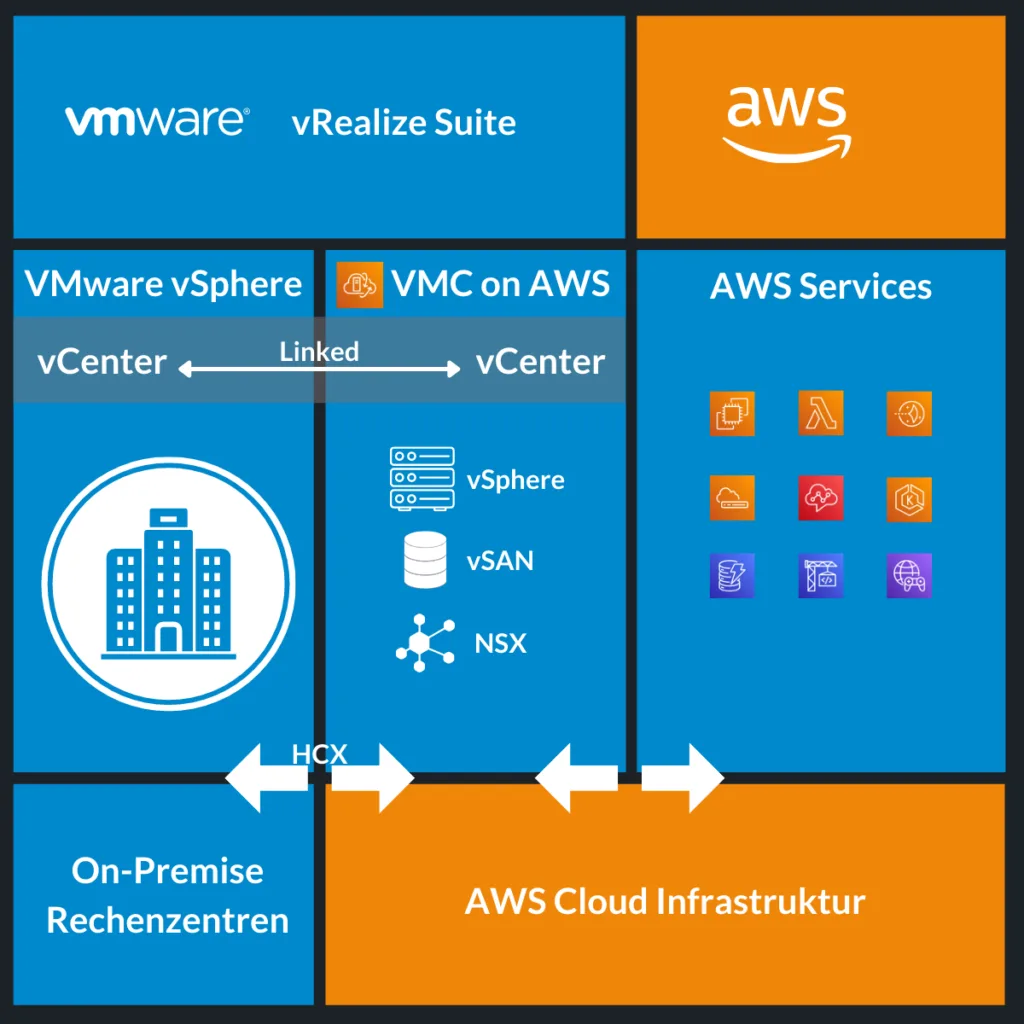
VMC on AWS includes optimised access to every AWS service.
Dedicated hardware
VMC on AWS runs on dedicated bare-metal hardware. Two server types are available, each aimed at a particular use case:
| i3 server | i3en server | |
|---|---|---|
| Typical use cases | Workloads with high clock rates: databases with online transaction processing (OLTP), high-speed analysis | Workloads with high capacity requirements: NoSQL databases, distributed file systems, data warehouses with high random I/O |
| CPU | Intel Xeon E5-2686, 36 cores at 2.3 GHz | 2nd generation Intel Xeon Scalable processor, 48 cores at 2.5 GHz |
| RAM | 512 GB | 768 GB |
| Storage | vSAN with NVMe flash, 10.3 TiB raw | vSAN with NVMe SSD, 45 TiB raw |
| Network | 25 Gbps | 25 Gbps with native east-west encryption |
| SLA | 99.9% (non-stretched), 99.99% (stretched) | 99.9% (non-stretched), 99.99% (stretched) |
The host type follows from what the workloads need. Both variants require a minimum of two hosts.
Once the workload is known, the VMC on AWS sizer finds the most suitable host type.
The VMware products included
These products are part of VMC on AWS:
- vCenter Server
- vSphere
- vSAN
- NSX
- Tanzu Kubernetes Grid Service
- Tanzu Mission Control Essentials
- VMware Global Support
- Lifecycle management by VMware (updates, patches and upgrades)
- Support for high availability (HA) and stretched clusters
- Service level agreements (SLA)
Further VMware products can be bought on top:
- Site Recovery
- Cloud Disaster Recovery
- NSX Advanced Firewall
- vRealize Automation Cloud
- vRealize Operations Cloud
- vRealize Log Insight Cloud
- Tanzu Standard
Use cases
VMC on AWS fits a lot of use cases. Here are a few in more detail.
Virtual desktop infrastructure
Over the past two years many companies found themselves obliged to work from home and had to give their people remote workplaces.
Cloud VDI can provide complete workstations, or extend existing virtual desktop solutions.
That optimises infrastructure cost and bills on a pay-what-you-use model.
Disaster recovery
Disaster recovery is one of the most used cases for VMC on AWS. Running a second data centre and keeping it available at all times is expensive in both money and people.
VMware offers solutions for different needs, all of which replicate into the cloud.
VMware Site Recovery Manager
This runs a hot standby, with the VMs replicated by SRM into a continuously running VMC on AWS SDDC. Switchover times are short because the SDDC is already up. More information
VMware HCX
VMware Hybrid Cloud Extension (HCX) allows migration into and out of the VMC on AWS cloud without the seams showing. Thanks to its built-in replication technology it can be used for disaster recovery too.
This solution also assumes a hot standby, with the VMC on AWS SDDC always running. More information
VMware Cloud Disaster Recovery (VCDR)
This replicates the data into an S3 storage bucket in the AWS cloud. In a disaster or a test, a VMC on AWS SDDC is started and the S3 bucket is attached automatically as NFS storage.
That makes it a kind of cold standby, because the SDDC has to be created when it is needed. The trade-off in availability shows up as lower recurring cost. More information
Extending your own data centre
Lead times for new hardware are currently longer than usual. That can delay important projects, which in turn can hurt the business. Extending your own data centre with resources from VMC on AWS gets you past that bottleneck quickly, and past a long lead time.
Seasonal shortages, over the Christmas trading period for example, can be covered with VMC on AWS resources too, which is an efficient alternative to keeping hardware in reserve.
Extending into your own data centre
VMC on AWS can be extended into your own data centre with VMC on AWS Outposts, which puts a fully managed service directly in your data centre.
The setup is built on Nitro EC2 bare-metal servers delivered as a complete VMware Cloud Foundation stack. With it, you no longer look after hardware and its lifecycle in your own data centre; you consume it as a service.
Use cases for Outposts
- Data and app locality
- Low latency
- Data protection requirements
- Infrastructure modernisation
- Local data processing
- Branch office and edge modernisation
Proof of concept
To find out whether VMC on AWS is a good fit for your cloud strategy, a single-host setup with one i3 host can be tested for 60 days. Not every service is available there, and because it is a single host the SLAs cannot be met.
For a smooth move into production, this single-node setup can be extended to a two-node setup within the 60 days. Otherwise the host is reset after 60 days and the data is deleted.
These services are not supported in a single-host setup:
- Service level agreements (SLA)
- Lifecycle management by VMware
- High availability (HA) and stretched clusters
Interested?
Has this post caught your interest? soulTec is the right partner for VMC on AWS consulting and engineering. Get in touch and we can talk about your use case, no strings attached, and work out together how well the VMC on AWS offering fits what you need.