An overview of Omnissa Horizon for Citrix customers
A guide for Citrix administrators who want to understand how Horizon is put together, and how its components map onto a Citrix environment.

An introduction to Horizon for Citrix users
Overview
Today’s working world needs access to applications at any time and from any device. In this new mobile cloud world, managing and delivering services to end users with traditional, PC-centric tools remains a challenge.
Omnissa Horizon provides a digital workplace that delivers virtual desktops and applications efficiently, so you can work anywhere, at any time, on any device. Through deep integration with our technology ecosystem, the platform offers an agile, cloud-capable foundation, first-rate modern management and end-to-end security that supports today’s work-from-anywhere workplace.
What this guide is for
This guide was written to make you, as a Citrix administrator, familiar with how Horizon is designed. The material is organised so that it reads easily for someone who knows Citrix. The aim is to explain the basic components of a Horizon environment and compare them with how a Citrix environment for desktops and applications is typically organised.
It is not a feature comparison between Citrix and Horizon. It is meant to give you a working understanding of a Horizon environment and to point you at further material for going deeper into the platform.
Deploying Horizon is straightforward: you can set up a basic environment in a few hours. This guide links to step-by-step instructions and interactive labs, so you can get going with a Horizon deployment quickly.
In this guide you will learn:
- What Horizon does and what it brings.
- How Horizon’s functions map onto those of Citrix Virtual Apps and Desktops.
- Where to learn more and try Horizon out.
Who it is for
This guide is for you if you are a Citrix administrator who wants to know more about Horizon. It assumes you are familiar with networking and storage in virtual environments, Active Directory, identity management and directory services.
An introduction to Omnissa Horizon
Horizon is a family of products that delivers virtual desktops and applications securely on a modern architecture, both on site and in the cloud. It gives you the best experience anywhere, at any time, on any device. It lets companies get more out of collaboration tools, support a broad range of client devices, and use an adaptive protocol that adjusts to changing network conditions. Horizon provides centralised desktops and applications, which makes for strong security because no data is stored on the device. On top of that, patching is simpler, access is fully controlled and the images are trusted.
Two architectures for the Horizon platform
The Horizon family offers several hybrid deployment architectures, depending on the infrastructure used for user capacity. One notable difference between the two platforms is that Horizon Cloud-based deployments draw a large part of their functionality from the Horizon Cloud Service, which lets organisations use a multi-site model where users are directed to resources at different locations. Horizon 8 can be connected to a cloud service, depending on the licence type, but does not depend on cloud-based functionality to work.
Omnissa Horizon 8
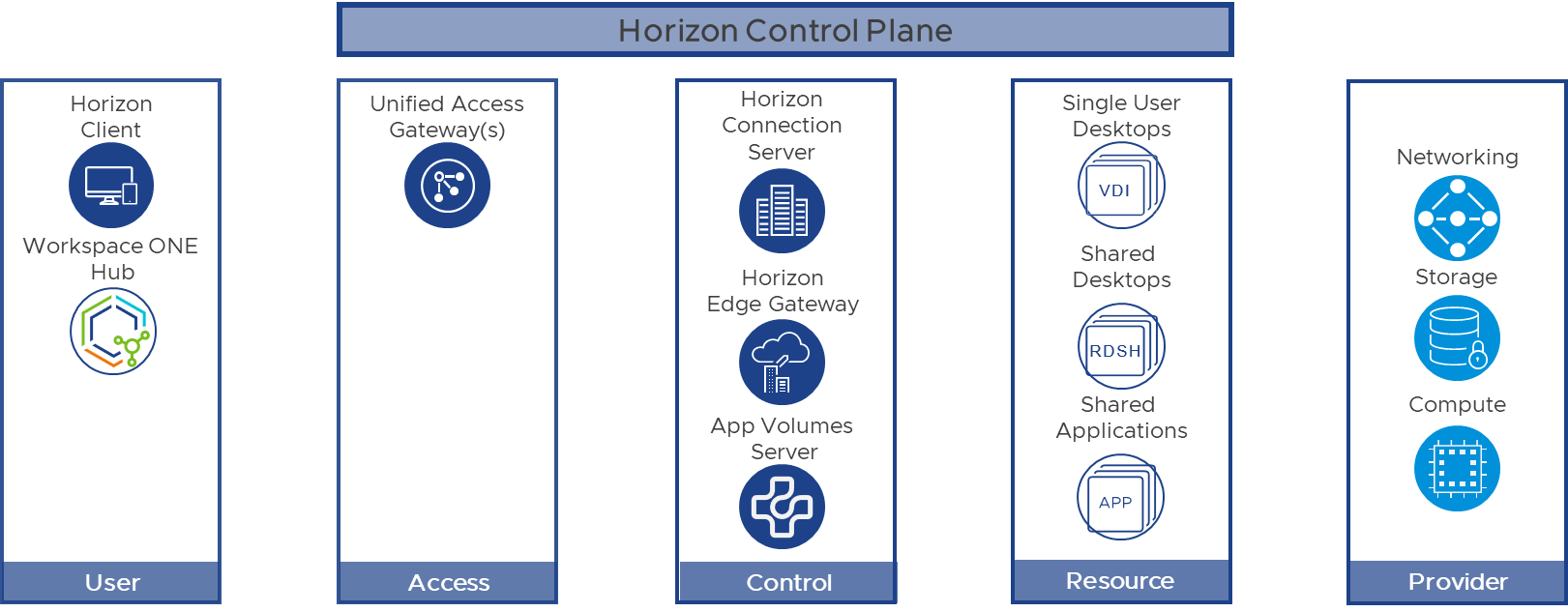
Horizon 8 concentrates on delivering desktops and remote applications on vSphere-based platforms. It can be deployed on site or on vSphere-capable cloud platforms. Horizon 8 can be connected to the Horizon Cloud Service for additional functionality. A more detailed overview is in “What is Horizon 8?”.
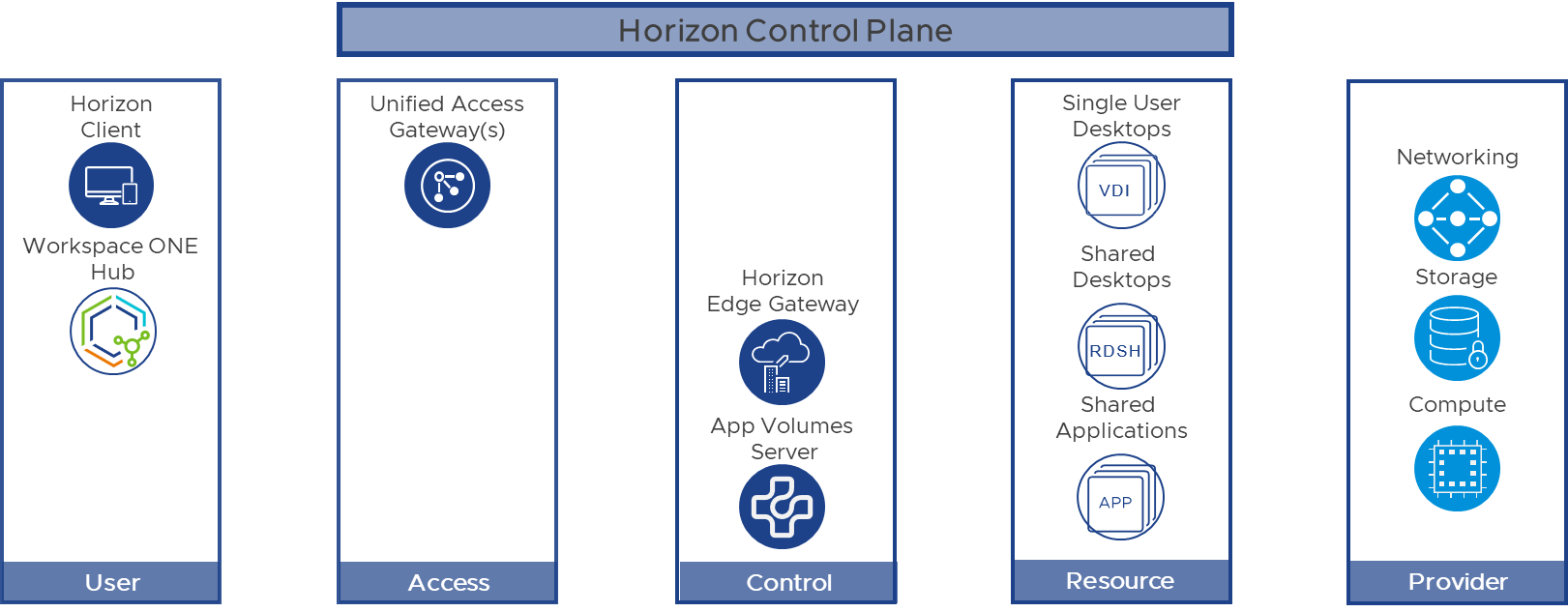
Omnissa Horizon Cloud Service, next-gen
Horizon Cloud Service is built on a SaaS platform that delivers desktops and remote applications on native cloud infrastructure platforms. Critical services such as the administration console, brokering and image management come from a cloud-based control plane called the Horizon Cloud Service. It uses a Horizon Edge Gateway, deployed on an infrastructure platform, to provide virtual desktops and application hosts to end users. Further detail is in “What is Horizon Cloud Service, next-gen?”.
The end-user experience
Horizon uses the same client and agent across every deployment architecture. Those components provide the basic end-user functionality on any Horizon platform, subject to what the infrastructure platform allows.
- The Horizon Client is installed on a client device to reach a Horizon-managed system running the Horizon Agent. Alternatively you can use a web browser as an HTML client, where installing client software is not possible.
- The Horizon Agent is installed in the guest operating system of the target VM, the master VM or the system. It lets connection servers manage the machine and lets the Horizon Client establish a protocol connection to it.
Horizon is a multi-protocol solution. Three remote protocols are available when you create desktop pools or RDSH-published applications: Blast Extreme, PCoIP and RDP. These display protocols are encrypted, so you do not need a VPN connection to reach resources remotely.
Delivering workloads securely
Depending on your Horizon environment, you may or may not implement the following components. Some Horizon customers rely entirely on internal deployments, so users reach desktops and applications in a secure environment. Most organisations, though, want remote or untrusted users to reach resources as well. That applies to 90% of our customers.
Unified Access Gateway
The Unified Access Gateway is a virtual appliance that provides secure remote access from an external network to internal resources, Horizon-managed resources included. For most Horizon environments, perimeter security is provided by a Unified Access Gateway.
More about the Unified Access Gateway:
- The “components” section of the Horizon 8 architecture
- The architectural overview of the Horizon Cloud Service next-gen architecture
Workspace ONE Intelligent Hub
The Workspace ONE Intelligent Hub is an endpoint application that delivers digital workplaces. It serves as the delivery component for web, mobile and desktop, and gives you what you need to be productive: single sign-on, a unified app catalogue, people search, remote support and more. Further detail is in “What is Workspace ONE Intelligent Hub?”.
The basic architectural components
The core components of Horizon environments are largely similar, with a few important differences. The basic user flow is that a Horizon Client connects to a broker, which directs users to virtual desktops and applications. The Horizon Client then establishes a protocol connection to a Horizon Agent running on a virtual desktop, an RDSH server or a physical machine.
Horizon Edge Gateway
A Horizon Edge Gateway connects the infrastructure to the Horizon Cloud Service. How a Horizon Edge Gateway deployment is configured depends on the underlying infrastructure platform. The gateway provides the connectivity between your infrastructure and the Horizon Cloud Service. Its main functions cover subscription entitlement for Horizon Universal or Horizon Plus subscribers, monitoring of Horizon components and, where needed, orchestration of the infrastructure.
More about the Horizon Edge Gateway in Horizon 8 environments is in the Horizon 8 reference architecture.
Horizon clients and agents
Horizon clients and agents are similar across deployments. Functions that do not depend on a particular operating system or specific infrastructure elements should work the same way in Horizon 8 and in Horizon Cloud deployments.
Brokering components
- In Horizon 8 deployments, users are brokered to workloads through the connection server hosted in each Horizon 8 pod in your infrastructure.
- In Horizon Cloud next-gen deployments, users are brokered to workloads through a component in the Horizon Cloud Service.
End users
End users reach virtual desktops and remotely delivered applications through Horizon. The capacity for end users covers:
- Virtual desktops (persistent, non-persistent): full-VM virtual desktops that are either user-specific (persistent) or floating (non-persistent).
- Shared desktops (RDSH or Windows multi-session): session-based desktops that several users can use.
- Application host farms (RDSH or Windows multi-session): shared applications delivered from farms of hosts.
Virtual desktops, persistent
These desktops are full clones of virtual machines and provide a personalised environment. User personalisation comes from Dynamic Environment Manager. Once the virtual machines exist, they have to be updated individually with traditional OS management systems.
Virtual desktops, non-persistent (floating)
These desktops are created, used, and then reset or deleted after each use. They can be created from a single image. User applications can optionally be delivered with App Volumes, while user personalisation comes from Dynamic Environment Manager.
Ways of delivering non-persistent workloads:
- Full clone: a user is assigned a virtual machine that is recycled after logoff.
- Instant clones: a vSphere-based technology for creating automated pools or farms of instant clones quickly.
Further detail is in “Business Drivers, Use Cases and Service Definitions” in the Horizon 8 reference architecture.
Shared desktops and application hosts
Microsoft Windows machines deliver session-based applications and desktops, made possible by Remote Desktop Services (RDS).
More information:
- “Creating RDSH-published applications” in the Horizon 8 evaluation guide
The infrastructure layer
Some basic architectural components (the control plane) and all end-user capacity (the resource layer) run on infrastructure platforms such as vSphere, Microsoft Azure or Amazon Workspaces. Horizon orchestrates the creation and reuse of user resources automatically, based on how the Horizon deployment is configured.
Horizon 8
Horizon 8 can deploy or manage virtual machines on several infrastructure platforms:
- vSphere-based platforms in private data centres.
- Cloud platforms that use vSphere (VMC on AWS, for example). See “Horizon on other cloud platforms” in the Horizon tab of the reference architecture.
Horizon 8 can also manage remote agents, to use capacity on other platforms such as:
- Unmanaged resources in other data centres.
- Unmanaged resources in cloud infrastructure such as Amazon Workspaces.
Horizon Cloud Service, next-gen
Horizon Cloud Service next-gen can deploy virtual machines on native Microsoft Azure infrastructure. The service delivers virtualised Windows desktops and applications to nearly any endpoint: Windows, Mac and Linux desktops and laptops, Chromebooks, tablets, smartphones, thin clients and zero clients. As a cloud-based service it provides the main management tools used in a desktops-as-a-service (DaaS) model, and allows the use of both on-premises platforms and cloud infrastructure platforms.
Horizon 8 and Horizon Cloud deployments both use a Horizon Edge Gateway to connect to the Horizon Cloud Service and use its functions.
Getting started
Now that you know what Horizon does and what it can do, you can go deeper using the resources below. Start with the hands-on labs for practical experience without any extra infrastructure; all you need is a web browser. After that you can build a proof-of-concept environment and, eventually, a full production environment.
Building a proof of concept
Once you are familiar with Omnissa Horizon, you can build and tune a proof-of-concept environment using the Horizon 8 evaluation guide and the optimisation tools. Or take our soulTec Horizon proof-of-concept offer.
We are happy to do demos and to talk it through in a workshop.