build 6ddc7a35 | content blog-content@417154f · 338 posts | profiles 32 · corpus 315 | ● 0 skipped | format run

$ soultec get post/how-to-vcf-ops-for-logs -o yaml$ soultec get post/how-to-vcf-ops-for-logs -o json$ soultec get post/how-to-vcf-ops-for-logs -o toml$ soultec get post/how-to-vcf-ops-for-logs -o xml$ python3 how-to-vcf-ops-for-logs.pyPS> ./how-to-vcf-ops-for-logs.ps1$ go run how-to-vcf-ops-for-logs.go$ node how-to-vcf-ops-for-logs.js

apiVersion: soultec.ch/v1kind: Postmetadata: name: how-to-vcf-ops-for-logs locale: en labels: author: daniel-stadelmann series: how-to capability/monitoring: 2.44 capability/cloud: 1.92 capability/virtualization: 1.42 vendor/vmware: 0.98 annotations: source: blog-content/posts/en/how-to-vcf-ops-for-logs.md route: /en/insights/how-to-vcf-ops-for-logs/ schema: /nerd/schema/posts.json markdown: /en/insights/how-to-vcf-ops-for-logs.mdspec: title: VCF Operations for Logs 9.0 date: 2025-08-22 author: daniel-stadelmann locale: en summary: >- You upgraded VCF Operations to 9.0, lost the link to VCF Operations for Logs, found there is no upgrade path for it, rebuilt it, and now want the connection back. capabilities: [monitoring, cloud, virtualization] vendors: [vmware] series: how-to hero: /blog-assets/how-to-vcf-ops-for-logs/hero.webp migrated: 2026-08-24 translationReviewed: false draft: false sections: - body: | You are probably like us, in that 9.0 could not come fast enough. You have already upgraded VCF Operations (formerly Aria Operations) from 8.18.x to 9.0. You lost the connection to VCF Operations for Logs (formerly Aria Operations for Logs) and found that there is no upgrade path for it, only a rebuild. That worked, and now you want the connection to VCF Operations back. ### Act 1: connecting VCF Operations for Logs and VCF Operations Nothing happens without the VCF Fleet Management Appliance. In VCF 9.0, Fleet Management runs the entire lifecycle of every component, and that includes provisioning and importing the former Aria components. Once the VCF Fleet Management Appliance exists and is linked to VCF Operations, the components appear under Fleet Management -> Lifecycle -> VCF Management. First you import the existing VCF Operations component. Second comes VCF Operations for Logs. ![](/blog-assets/how-to-vcf-ops-for-logs/01.webp) If you have already provisioned VCF Operations for Logs, as I had, choose "Import" and connect the component. At this point you would assume the integration into VCF Operations is done and that licensing is handled centrally through VCF Operations as well. For licensing that is unfortunately not the case, under certain conditions. ### Act 2: VCF Operations for Logs licensing Logging in to VCF Operations for Logs greets you with an evaluation mode message. Under Management -> License it says "No License". In 9.0 there is no longer an option to install a licence key, because licensing runs centrally through VCF Operations. So why does that not take effect here? ![](/blog-assets/how-to-vcf-ops-for-logs/02.webp) After some digging I found [this KB](https://knowledge.broadcom.com/external/article/404339/no-license-message-in-vmware-cloud-found.html). Right at the bottom it says "If you have vCenter servers on V8.0 which is licensed correctly with VCF/VVF license this is expected behavior." Which means licensing through VCF Operations only works once vCenter is upgraded to 9.0. Until then, VCF Operations for Logs stays in evaluation mode. ### What this says about VCF Operations With the release of VMware Cloud Foundation 9.0, VCF Operations went from an optional add-on to a core component. Everything now runs through it. Trouble or questions? [Get in touch](https://soultec.ch/contact-us/).status: corpus: 315 alsoLike: - {ref: posts/vcf-full-stack-ab-oktober-2027-mythos-oder-wahrheit, score: 0.70} - {ref: posts/ms-secure-boot-cert-expiry-2026, score: 0.70} - {ref: solutions/vmware/vsphere-foundation, score: 0.70} search: /en/search.json
{ "apiVersion": "soultec.ch/v1", "kind": "Post", "metadata": { "name": "how-to-vcf-ops-for-logs", "locale": "en", "labels": { "author": "daniel-stadelmann", "series": "how-to", "capability/monitoring": 2.44, "capability/cloud": 1.92, "capability/virtualization": 1.42, "vendor/vmware": 0.98 }, "annotations": { "source": "blog-content/posts/en/how-to-vcf-ops-for-logs.md", "route": "/en/insights/how-to-vcf-ops-for-logs/", "schema": "/nerd/schema/posts.json", "markdown": "/en/insights/how-to-vcf-ops-for-logs.md" } }, "spec": { "title": "VCF Operations for Logs 9.0", "date": "2025-08-22", "author": "daniel-stadelmann", "locale": "en", "summary": "You upgraded VCF Operations to 9.0, lost the link to VCF Operations for Logs, found there is no upgrade path for it, rebuilt it, and now want the connection back.", "capabilities": [ "monitoring", "cloud", "virtualization" ], "vendors": [ "vmware" ], "series": "how-to", "hero": "/blog-assets/how-to-vcf-ops-for-logs/hero.webp", "migrated": "2026-08-24", "translationReviewed": false, "draft": false, "sections": [ { "body": "You are probably like us, in that 9.0 could not come fast enough. You have already upgraded VCF Operations (formerly Aria Operations) from 8.18.x to 9.0. You lost the connection to VCF Operations for Logs (formerly Aria Operations for Logs) and found that there is no upgrade path for it, only a rebuild. That worked, and now you want the connection to VCF Operations back.\n\n### Act 1: connecting VCF Operations for Logs and VCF Operations\n\nNothing happens without the VCF Fleet Management Appliance. In VCF 9.0, Fleet Management runs the entire lifecycle of every component, and that includes provisioning and importing the former Aria components.\n\nOnce the VCF Fleet Management Appliance exists and is linked to VCF Operations, the components appear under Fleet Management -> Lifecycle -> VCF Management. First you import the existing VCF Operations component. Second comes VCF Operations for Logs.\n\n![](/blog-assets/how-to-vcf-ops-for-logs/01.webp)\n\nIf you have already provisioned VCF Operations for Logs, as I had, choose \"Import\" and connect the component.\n\nAt this point you would assume the integration into VCF Operations is done and that licensing is handled centrally through VCF Operations as well. For licensing that is unfortunately not the case, under certain conditions.\n\n### Act 2: VCF Operations for Logs licensing\n\nLogging in to VCF Operations for Logs greets you with an evaluation mode message. Under Management -> License it says \"No License\". In 9.0 there is no longer an option to install a licence key, because licensing runs centrally through VCF Operations. So why does that not take effect here?\n\n![](/blog-assets/how-to-vcf-ops-for-logs/02.webp)\n\nAfter some digging I found [this KB](https://knowledge.broadcom.com/external/article/404339/no-license-message-in-vmware-cloud-found.html). Right at the bottom it says \"If you have vCenter servers on V8.0 which is licensed correctly with VCF/VVF license this is expected behavior.\"\n\nWhich means licensing through VCF Operations only works once vCenter is upgraded to 9.0. Until then, VCF Operations for Logs stays in evaluation mode.\n\n### What this says about VCF Operations\n\nWith the release of VMware Cloud Foundation 9.0, VCF Operations went from an optional add-on to a core component. Everything now runs through it.\n\nTrouble or questions? [Get in touch](https://soultec.ch/contact-us/)." } ] }, "status": { "corpus": 315, "alsoLike": [ { "ref": "posts/vcf-full-stack-ab-oktober-2027-mythos-oder-wahrheit", "score": "0.70" }, { "ref": "posts/ms-secure-boot-cert-expiry-2026", "score": "0.70" }, { "ref": "solutions/vmware/vsphere-foundation", "score": "0.70" } ], "search": "/en/search.json" }}
apiVersion = "soultec.ch/v1"kind = "Post"[metadata]name = "how-to-vcf-ops-for-logs"locale = "en"[metadata.labels]author = "daniel-stadelmann"series = "how-to""capability/monitoring" = 2.44"capability/cloud" = 1.92"capability/virtualization" = 1.42"vendor/vmware" = 0.98[metadata.annotations]source = "blog-content/posts/en/how-to-vcf-ops-for-logs.md"route = "/en/insights/how-to-vcf-ops-for-logs/"schema = "/nerd/schema/posts.json"markdown = "/en/insights/how-to-vcf-ops-for-logs.md"[spec]title = "VCF Operations for Logs 9.0"date = 2025-08-22author = "daniel-stadelmann"locale = "en"summary = "You upgraded VCF Operations to 9.0, lost the link to VCF Operations for Logs, found there is no upgrade path for it, rebuilt it, and now want the connection back."capabilities = ["monitoring", "cloud", "virtualization"]vendors = ["vmware"]series = "how-to"hero = "/blog-assets/how-to-vcf-ops-for-logs/hero.webp"migrated = 2026-08-24translationReviewed = falsedraft = false[[spec.sections]]body = '''You are probably like us, in that 9.0 could not come fast enough. You have already upgraded VCF Operations (formerly Aria Operations) from 8.18.x to 9.0. You lost the connection to VCF Operations for Logs (formerly Aria Operations for Logs) and found that there is no upgrade path for it, only a rebuild. That worked, and now you want the connection to VCF Operations back.### Act 1: connecting VCF Operations for Logs and VCF OperationsNothing happens without the VCF Fleet Management Appliance. In VCF 9.0, Fleet Management runs the entire lifecycle of every component, and that includes provisioning and importing the former Aria components.Once the VCF Fleet Management Appliance exists and is linked to VCF Operations, the components appear under Fleet Management -> Lifecycle -> VCF Management. First you import the existing VCF Operations component. Second comes VCF Operations for Logs.![](/blog-assets/how-to-vcf-ops-for-logs/01.webp)If you have already provisioned VCF Operations for Logs, as I had, choose "Import" and connect the component.At this point you would assume the integration into VCF Operations is done and that licensing is handled centrally through VCF Operations as well. For licensing that is unfortunately not the case, under certain conditions.### Act 2: VCF Operations for Logs licensingLogging in to VCF Operations for Logs greets you with an evaluation mode message. Under Management -> License it says "No License". In 9.0 there is no longer an option to install a licence key, because licensing runs centrally through VCF Operations. So why does that not take effect here?![](/blog-assets/how-to-vcf-ops-for-logs/02.webp)After some digging I found [this KB](https://knowledge.broadcom.com/external/article/404339/no-license-message-in-vmware-cloud-found.html). Right at the bottom it says "If you have vCenter servers on V8.0 which is licensed correctly with VCF/VVF license this is expected behavior."Which means licensing through VCF Operations only works once vCenter is upgraded to 9.0. Until then, VCF Operations for Logs stays in evaluation mode.### What this says about VCF OperationsWith the release of VMware Cloud Foundation 9.0, VCF Operations went from an optional add-on to a core component. Everything now runs through it.Trouble or questions? [Get in touch](https://soultec.ch/contact-us/).'''[status]corpus = 315search = "/en/search.json"[[status.alsoLike]]ref = "posts/vcf-full-stack-ab-oktober-2027-mythos-oder-wahrheit"score = "0.70"[[status.alsoLike]]ref = "posts/ms-secure-boot-cert-expiry-2026"score = "0.70"[[status.alsoLike]]ref = "solutions/vmware/vsphere-foundation"score = "0.70"
<?xml version="1.0" encoding="UTF-8"?><manifest kind="Post"> <apiVersion>soultec.ch/v1</apiVersion> <metadata> <name>how-to-vcf-ops-for-logs</name> <locale>en</locale> <labels> <author>daniel-stadelmann</author> <series>how-to</series> <entry key="capability/monitoring">2.44</entry> <entry key="capability/cloud">1.92</entry> <entry key="capability/virtualization">1.42</entry> <entry key="vendor/vmware">0.98</entry> </labels> <annotations> <source>blog-content/posts/en/how-to-vcf-ops-for-logs.md</source> <route>/en/insights/how-to-vcf-ops-for-logs/</route> <schema>/nerd/schema/posts.json</schema> <markdown>/en/insights/how-to-vcf-ops-for-logs.md</markdown> </annotations> </metadata> <spec> <title>VCF Operations for Logs 9.0</title> <date>2025-08-22</date> <author>daniel-stadelmann</author> <locale>en</locale> <summary>You upgraded VCF Operations to 9.0, lost the link to VCF Operations for Logs, found there is no upgrade path for it, rebuilt it, and now want the connection back.</summary> <capabilities> <item>monitoring</item> <item>cloud</item> <item>virtualization</item> </capabilities> <vendors> <item>vmware</item> </vendors> <series>how-to</series> <hero>/blog-assets/how-to-vcf-ops-for-logs/hero.webp</hero> <migrated>2026-08-24</migrated> <translationReviewed>false</translationReviewed> <draft>false</draft> <sections> <section> <body>You are probably like us, in that 9.0 could not come fast enough. You have already upgraded VCF Operations (formerly Aria Operations) from 8.18.x to 9.0. You lost the connection to VCF Operations for Logs (formerly Aria Operations for Logs) and found that there is no upgrade path for it, only a rebuild. That worked, and now you want the connection to VCF Operations back.### Act 1: connecting VCF Operations for Logs and VCF OperationsNothing happens without the VCF Fleet Management Appliance. In VCF 9.0, Fleet Management runs the entire lifecycle of every component, and that includes provisioning and importing the former Aria components.Once the VCF Fleet Management Appliance exists and is linked to VCF Operations, the components appear under Fleet Management -&gt; Lifecycle -&gt; VCF Management. First you import the existing VCF Operations component. Second comes VCF Operations for Logs.![](/blog-assets/how-to-vcf-ops-for-logs/01.webp)If you have already provisioned VCF Operations for Logs, as I had, choose "Import" and connect the component.At this point you would assume the integration into VCF Operations is done and that licensing is handled centrally through VCF Operations as well. For licensing that is unfortunately not the case, under certain conditions.### Act 2: VCF Operations for Logs licensingLogging in to VCF Operations for Logs greets you with an evaluation mode message. Under Management -&gt; License it says "No License". In 9.0 there is no longer an option to install a licence key, because licensing runs centrally through VCF Operations. So why does that not take effect here?![](/blog-assets/how-to-vcf-ops-for-logs/02.webp)After some digging I found [this KB](https://knowledge.broadcom.com/external/article/404339/no-license-message-in-vmware-cloud-found.html). Right at the bottom it says "If you have vCenter servers on V8.0 which is licensed correctly with VCF/VVF license this is expected behavior."Which means licensing through VCF Operations only works once vCenter is upgraded to 9.0. Until then, VCF Operations for Logs stays in evaluation mode.### What this says about VCF OperationsWith the release of VMware Cloud Foundation 9.0, VCF Operations went from an optional add-on to a core component. Everything now runs through it.Trouble or questions? [Get in touch](https://soultec.ch/contact-us/). </body> </section> </sections> </spec> <status> <corpus>315</corpus> <alsoLike> <item> <ref>posts/vcf-full-stack-ab-oktober-2027-mythos-oder-wahrheit</ref> <score>0.70</score> </item> <item> <ref>posts/ms-secure-boot-cert-expiry-2026</ref> <score>0.70</score> </item> <item> <ref>solutions/vmware/vsphere-foundation</ref> <score>0.70</score> </item> </alsoLike> <search>/en/search.json</search> </status></manifest>
# Code generated by the soultec.ch build. DO NOT EDIT.import jsonPAGE = { "apiVersion": "soultec.ch/v1", "kind": "Post", "metadata": { "name": "how-to-vcf-ops-for-logs", "locale": "en", "labels": { "author": "daniel-stadelmann", "series": "how-to", "capability/monitoring": 2.44, "capability/cloud": 1.92, "capability/virtualization": 1.42, "vendor/vmware": 0.98, }, "annotations": { "source": "blog-content/posts/en/how-to-vcf-ops-for-logs.md", "route": "/en/insights/how-to-vcf-ops-for-logs/", "schema": "/nerd/schema/posts.json", "markdown": "/en/insights/how-to-vcf-ops-for-logs.md", }, }, "spec": { "title": "VCF Operations for Logs 9.0", "date": "2025-08-22", "author": "daniel-stadelmann", "locale": "en", "summary": "You upgraded VCF Operations to 9.0, lost the link to VCF Operations for Logs, found there is no upgrade path for it, rebuilt it, and now want the connection back.", "capabilities": ["monitoring", "cloud", "virtualization"], "vendors": ["vmware"], "series": "how-to", "hero": "/blog-assets/how-to-vcf-ops-for-logs/hero.webp", "migrated": "2026-08-24", "translationReviewed": False, "draft": False, "sections": [ { "body": ( "You are probably like us, in that 9.0 could not come fast enough. You have already upgraded VCF Operations (formerly Aria Operations) from 8.18.x to 9.0. You lost the connection to VCF Operations for Logs (formerly Aria Operations for Logs) and found that there is no upgrade path for it, only a rebuild. That worked, and now you want the connection to VCF Operations back.\n" "\n" "### Act 1: connecting VCF Operations for Logs and VCF Operations\n" "\n" "Nothing happens without the VCF Fleet Management Appliance. In VCF 9.0, Fleet Management runs the entire lifecycle of every component, and that includes provisioning and importing the former Aria components.\n" "\n" "Once the VCF Fleet Management Appliance exists and is linked to VCF Operations, the components appear under Fleet Management -> Lifecycle -> VCF Management. First you import the existing VCF Operations component. Second comes VCF Operations for Logs.\n" "\n" "![](/blog-assets/how-to-vcf-ops-for-logs/01.webp)\n" "\n" "If you have already provisioned VCF Operations for Logs, as I had, choose \"Import\" and connect the component.\n" "\n" "At this point you would assume the integration into VCF Operations is done and that licensing is handled centrally through VCF Operations as well. For licensing that is unfortunately not the case, under certain conditions.\n" "\n" "### Act 2: VCF Operations for Logs licensing\n" "\n" "Logging in to VCF Operations for Logs greets you with an evaluation mode message. Under Management -> License it says \"No License\". In 9.0 there is no longer an option to install a licence key, because licensing runs centrally through VCF Operations. So why does that not take effect here?\n" "\n" "![](/blog-assets/how-to-vcf-ops-for-logs/02.webp)\n" "\n" "After some digging I found [this KB](https://knowledge.broadcom.com/external/article/404339/no-license-message-in-vmware-cloud-found.html). Right at the bottom it says \"If you have vCenter servers on V8.0 which is licensed correctly with VCF/VVF license this is expected behavior.\"\n" "\n" "Which means licensing through VCF Operations only works once vCenter is upgraded to 9.0. Until then, VCF Operations for Logs stays in evaluation mode.\n" "\n" "### What this says about VCF Operations\n" "\n" "With the release of VMware Cloud Foundation 9.0, VCF Operations went from an optional add-on to a core component. Everything now runs through it.\n" "\n" "Trouble or questions? [Get in touch](https://soultec.ch/contact-us/)." ), }, ], }, "status": { "corpus": 315, "alsoLike": [ { "ref": "posts/vcf-full-stack-ab-oktober-2027-mythos-oder-wahrheit", "score": "0.70", }, { "ref": "posts/ms-secure-boot-cert-expiry-2026", "score": "0.70", }, { "ref": "solutions/vmware/vsphere-foundation", "score": "0.70", }, ], "search": "/en/search.json", },}if __name__ == "__main__": print(json.dumps(PAGE, indent=2, ensure_ascii=False))
# Code generated by the soultec.ch build. DO NOT EDIT.$Page = [ordered]@{ apiVersion = 'soultec.ch/v1' kind = 'Post' metadata = [ordered]@{ name = 'how-to-vcf-ops-for-logs' locale = 'en' labels = [ordered]@{ author = 'daniel-stadelmann' series = 'how-to' 'capability/monitoring' = 2.44 'capability/cloud' = 1.92 'capability/virtualization' = 1.42 'vendor/vmware' = 0.98 } annotations = [ordered]@{ source = 'blog-content/posts/en/how-to-vcf-ops-for-logs.md' route = '/en/insights/how-to-vcf-ops-for-logs/' schema = '/nerd/schema/posts.json' markdown = '/en/insights/how-to-vcf-ops-for-logs.md' } } spec = [ordered]@{ title = 'VCF Operations for Logs 9.0' date = '2025-08-22' author = 'daniel-stadelmann' locale = 'en' summary = 'You upgraded VCF Operations to 9.0, lost the link to VCF Operations for Logs, found there is no upgrade path for it, rebuilt it, and now want the connection back.' capabilities = @('monitoring', 'cloud', 'virtualization') vendors = @('vmware') series = 'how-to' hero = '/blog-assets/how-to-vcf-ops-for-logs/hero.webp' migrated = '2026-08-24' translationReviewed = $false draft = $false sections = @( [ordered]@{ body = @'You are probably like us, in that 9.0 could not come fast enough. You have already upgraded VCF Operations (formerly Aria Operations) from 8.18.x to 9.0. You lost the connection to VCF Operations for Logs (formerly Aria Operations for Logs) and found that there is no upgrade path for it, only a rebuild. That worked, and now you want the connection to VCF Operations back.### Act 1: connecting VCF Operations for Logs and VCF OperationsNothing happens without the VCF Fleet Management Appliance. In VCF 9.0, Fleet Management runs the entire lifecycle of every component, and that includes provisioning and importing the former Aria components.Once the VCF Fleet Management Appliance exists and is linked to VCF Operations, the components appear under Fleet Management -> Lifecycle -> VCF Management. First you import the existing VCF Operations component. Second comes VCF Operations for Logs.![](/blog-assets/how-to-vcf-ops-for-logs/01.webp)If you have already provisioned VCF Operations for Logs, as I had, choose "Import" and connect the component.At this point you would assume the integration into VCF Operations is done and that licensing is handled centrally through VCF Operations as well. For licensing that is unfortunately not the case, under certain conditions.### Act 2: VCF Operations for Logs licensingLogging in to VCF Operations for Logs greets you with an evaluation mode message. Under Management -> License it says "No License". In 9.0 there is no longer an option to install a licence key, because licensing runs centrally through VCF Operations. So why does that not take effect here?![](/blog-assets/how-to-vcf-ops-for-logs/02.webp)After some digging I found [this KB](https://knowledge.broadcom.com/external/article/404339/no-license-message-in-vmware-cloud-found.html). Right at the bottom it says "If you have vCenter servers on V8.0 which is licensed correctly with VCF/VVF license this is expected behavior."Which means licensing through VCF Operations only works once vCenter is upgraded to 9.0. Until then, VCF Operations for Logs stays in evaluation mode.### What this says about VCF OperationsWith the release of VMware Cloud Foundation 9.0, VCF Operations went from an optional add-on to a core component. Everything now runs through it.Trouble or questions? [Get in touch](https://soultec.ch/contact-us/).'@ } ) } status = [ordered]@{ corpus = 315 alsoLike = @( [ordered]@{ ref = 'posts/vcf-full-stack-ab-oktober-2027-mythos-oder-wahrheit' score = '0.70' } [ordered]@{ ref = 'posts/ms-secure-boot-cert-expiry-2026' score = '0.70' } [ordered]@{ ref = 'solutions/vmware/vsphere-foundation' score = '0.70' } ) search = '/en/search.json' }}$Page | ConvertTo-Json -Depth 32
// Code generated by the soultec.ch build. DO NOT EDIT.package mainimport ( "encoding/json" "os")var page = map[string]any{ "apiVersion": "soultec.ch/v1", "kind": "Post", "metadata": map[string]any{ "name": "how-to-vcf-ops-for-logs", "locale": "en", "labels": map[string]any{ "author": "daniel-stadelmann", "series": "how-to", "capability/monitoring": 2.44, "capability/cloud": 1.92, "capability/virtualization": 1.42, "vendor/vmware": 0.98, }, "annotations": map[string]any{ "source": "blog-content/posts/en/how-to-vcf-ops-for-logs.md", "route": "/en/insights/how-to-vcf-ops-for-logs/", "schema": "/nerd/schema/posts.json", "markdown": "/en/insights/how-to-vcf-ops-for-logs.md", }, }, "spec": map[string]any{ "title": "VCF Operations for Logs 9.0", "date": "2025-08-22", "author": "daniel-stadelmann", "locale": "en", "summary": "You upgraded VCF Operations to 9.0, lost the link to VCF Operations for Logs, found there is no upgrade path for it, rebuilt it, and now want the connection back.", "capabilities": []any{"monitoring", "cloud", "virtualization"}, "vendors": []any{"vmware"}, "series": "how-to", "hero": "/blog-assets/how-to-vcf-ops-for-logs/hero.webp", "migrated": "2026-08-24", "translationReviewed": false, "draft": false, "sections": []any{ map[string]any{ "body": "You are probably like us, in that 9.0 could not come fast enough. You have already upgraded VCF Operations (formerly Aria Operations) from 8.18.x to 9.0. You lost the connection to VCF Operations for Logs (formerly Aria Operations for Logs) and found that there is no upgrade path for it, only a rebuild. That worked, and now you want the connection to VCF Operations back.\n" + "\n" + "### Act 1: connecting VCF Operations for Logs and VCF Operations\n" + "\n" + "Nothing happens without the VCF Fleet Management Appliance. In VCF 9.0, Fleet Management runs the entire lifecycle of every component, and that includes provisioning and importing the former Aria components.\n" + "\n" + "Once the VCF Fleet Management Appliance exists and is linked to VCF Operations, the components appear under Fleet Management -> Lifecycle -> VCF Management. First you import the existing VCF Operations component. Second comes VCF Operations for Logs.\n" + "\n" + "![](/blog-assets/how-to-vcf-ops-for-logs/01.webp)\n" + "\n" + "If you have already provisioned VCF Operations for Logs, as I had, choose \"Import\" and connect the component.\n" + "\n" + "At this point you would assume the integration into VCF Operations is done and that licensing is handled centrally through VCF Operations as well. For licensing that is unfortunately not the case, under certain conditions.\n" + "\n" + "### Act 2: VCF Operations for Logs licensing\n" + "\n" + "Logging in to VCF Operations for Logs greets you with an evaluation mode message. Under Management -> License it says \"No License\". In 9.0 there is no longer an option to install a licence key, because licensing runs centrally through VCF Operations. So why does that not take effect here?\n" + "\n" + "![](/blog-assets/how-to-vcf-ops-for-logs/02.webp)\n" + "\n" + "After some digging I found [this KB](https://knowledge.broadcom.com/external/article/404339/no-license-message-in-vmware-cloud-found.html). Right at the bottom it says \"If you have vCenter servers on V8.0 which is licensed correctly with VCF/VVF license this is expected behavior.\"\n" + "\n" + "Which means licensing through VCF Operations only works once vCenter is upgraded to 9.0. Until then, VCF Operations for Logs stays in evaluation mode.\n" + "\n" + "### What this says about VCF Operations\n" + "\n" + "With the release of VMware Cloud Foundation 9.0, VCF Operations went from an optional add-on to a core component. Everything now runs through it.\n" + "\n" + "Trouble or questions? [Get in touch](https://soultec.ch/contact-us/).", }, }, }, "status": map[string]any{ "corpus": 315, "alsoLike": []any{ map[string]any{ "ref": "posts/vcf-full-stack-ab-oktober-2027-mythos-oder-wahrheit", "score": "0.70", }, map[string]any{ "ref": "posts/ms-secure-boot-cert-expiry-2026", "score": "0.70", }, map[string]any{ "ref": "solutions/vmware/vsphere-foundation", "score": "0.70", }, }, "search": "/en/search.json", },}func main() { enc := json.NewEncoder(os.Stdout) enc.SetEscapeHTML(false) enc.SetIndent("", " ") if err := enc.Encode(page); err != nil { os.Exit(1) }}
// Code generated by the soultec.ch build. DO NOT EDIT.const page = { apiVersion: "soultec.ch/v1", kind: "Post", metadata: { name: "how-to-vcf-ops-for-logs", locale: "en", labels: { author: "daniel-stadelmann", series: "how-to", "capability/monitoring": 2.44, "capability/cloud": 1.92, "capability/virtualization": 1.42, "vendor/vmware": 0.98, }, annotations: { source: "blog-content/posts/en/how-to-vcf-ops-for-logs.md", route: "/en/insights/how-to-vcf-ops-for-logs/", schema: "/nerd/schema/posts.json", markdown: "/en/insights/how-to-vcf-ops-for-logs.md", }, }, spec: { title: "VCF Operations for Logs 9.0", date: "2025-08-22", author: "daniel-stadelmann", locale: "en", summary: "You upgraded VCF Operations to 9.0, lost the link to VCF Operations for Logs, found there is no upgrade path for it, rebuilt it, and now want the connection back.", capabilities: ["monitoring", "cloud", "virtualization"], vendors: ["vmware"], series: "how-to", hero: "/blog-assets/how-to-vcf-ops-for-logs/hero.webp", migrated: "2026-08-24", translationReviewed: false, draft: false, sections: [ { body: "You are probably like us, in that 9.0 could not come fast enough. You have already upgraded VCF Operations (formerly Aria Operations) from 8.18.x to 9.0. You lost the connection to VCF Operations for Logs (formerly Aria Operations for Logs) and found that there is no upgrade path for it, only a rebuild. That worked, and now you want the connection to VCF Operations back.\n" + "\n" + "### Act 1: connecting VCF Operations for Logs and VCF Operations\n" + "\n" + "Nothing happens without the VCF Fleet Management Appliance. In VCF 9.0, Fleet Management runs the entire lifecycle of every component, and that includes provisioning and importing the former Aria components.\n" + "\n" + "Once the VCF Fleet Management Appliance exists and is linked to VCF Operations, the components appear under Fleet Management -> Lifecycle -> VCF Management. First you import the existing VCF Operations component. Second comes VCF Operations for Logs.\n" + "\n" + "![](/blog-assets/how-to-vcf-ops-for-logs/01.webp)\n" + "\n" + "If you have already provisioned VCF Operations for Logs, as I had, choose \"Import\" and connect the component.\n" + "\n" + "At this point you would assume the integration into VCF Operations is done and that licensing is handled centrally through VCF Operations as well. For licensing that is unfortunately not the case, under certain conditions.\n" + "\n" + "### Act 2: VCF Operations for Logs licensing\n" + "\n" + "Logging in to VCF Operations for Logs greets you with an evaluation mode message. Under Management -> License it says \"No License\". In 9.0 there is no longer an option to install a licence key, because licensing runs centrally through VCF Operations. So why does that not take effect here?\n" + "\n" + "![](/blog-assets/how-to-vcf-ops-for-logs/02.webp)\n" + "\n" + "After some digging I found [this KB](https://knowledge.broadcom.com/external/article/404339/no-license-message-in-vmware-cloud-found.html). Right at the bottom it says \"If you have vCenter servers on V8.0 which is licensed correctly with VCF/VVF license this is expected behavior.\"\n" + "\n" + "Which means licensing through VCF Operations only works once vCenter is upgraded to 9.0. Until then, VCF Operations for Logs stays in evaluation mode.\n" + "\n" + "### What this says about VCF Operations\n" + "\n" + "With the release of VMware Cloud Foundation 9.0, VCF Operations went from an optional add-on to a core component. Everything now runs through it.\n" + "\n" + "Trouble or questions? [Get in touch](https://soultec.ch/contact-us/).", }, ], }, status: { corpus: 315, alsoLike: [ { ref: "posts/vcf-full-stack-ab-oktober-2027-mythos-oder-wahrheit", score: "0.70", }, { ref: "posts/ms-secure-boot-cert-expiry-2026", score: "0.70", }, { ref: "solutions/vmware/vsphere-foundation", score: "0.70", }, ], search: "/en/search.json", },};console.log(JSON.stringify(page, null, 2));

# 70 lines · YAML · validated at build# 65 lines · JSON · validated at build# 83 lines · TOML · validated at build# 95 lines · XML · validated at build# 95 lines · Python · read back at build, equals the JSON record# 92 lines · PowerShell · read back at build, equals the JSON record# 105 lines · Go · read back at build, equals the JSON record# 90 lines · JavaScript · read back at build, equals the JSON record · served at /en/insights/how-to-vcf-ops-for-logs.md

How-To · 2025-08-22

VCF Operations for Logs 9.0

You upgraded VCF Operations to 9.0, lost the link to VCF Operations for Logs, found there is no upgrade path for it, rebuilt it, and now want the connection back.

2025-08-22Date
Daniel StadelmannAuthor
2Min read
Vendors VMware 0.98

You are probably like us, in that 9.0 could not come fast enough. You have already upgraded VCF Operations (formerly Aria Operations) from 8.18.x to 9.0. You lost the connection to VCF Operations for Logs (formerly Aria Operations for Logs) and found that there is no upgrade path for it, only a rebuild. That worked, and now you want the connection to VCF Operations back.

Act 1: connecting VCF Operations for Logs and VCF Operations

Nothing happens without the VCF Fleet Management Appliance. In VCF 9.0, Fleet Management runs the entire lifecycle of every component, and that includes provisioning and importing the former Aria components.

Once the VCF Fleet Management Appliance exists and is linked to VCF Operations, the components appear under Fleet Management -> Lifecycle -> VCF Management. First you import the existing VCF Operations component. Second comes VCF Operations for Logs.
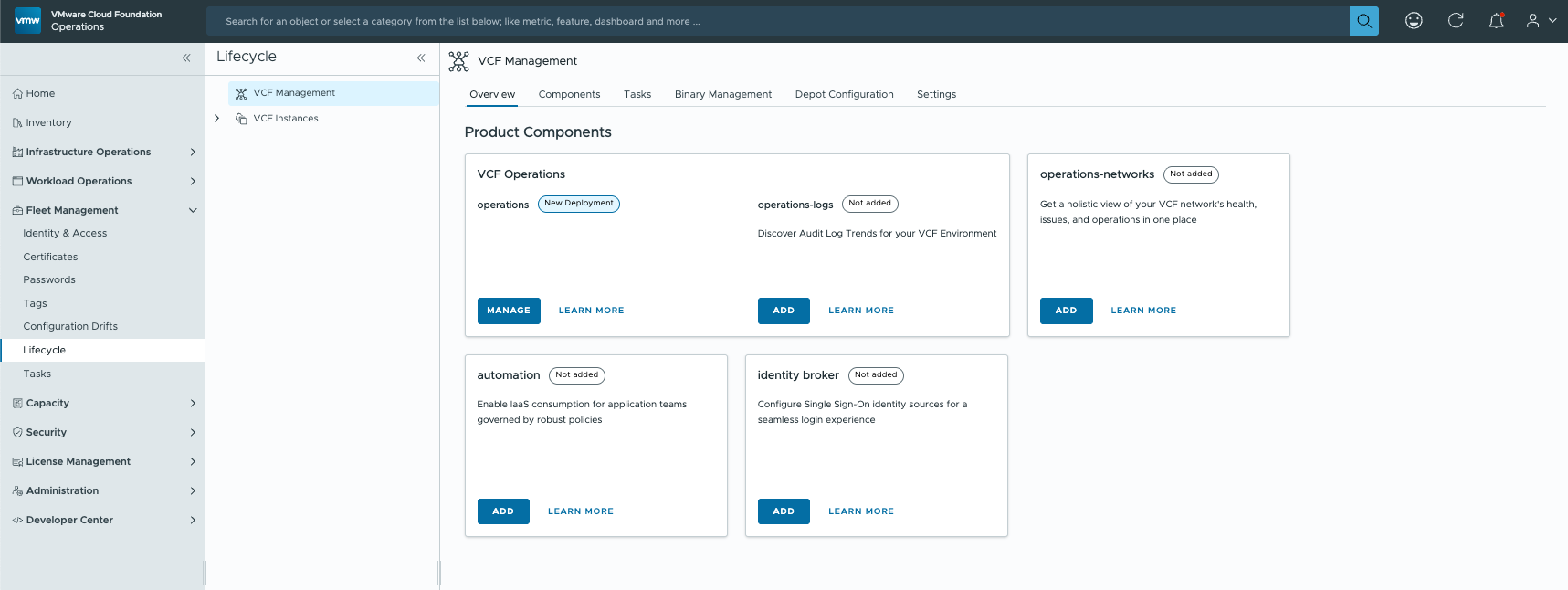
If you have already provisioned VCF Operations for Logs, as I had, choose “Import” and connect the component.

At this point you would assume the integration into VCF Operations is done and that licensing is handled centrally through VCF Operations as well. For licensing that is unfortunately not the case, under certain conditions.

Act 2: VCF Operations for Logs licensing

Logging in to VCF Operations for Logs greets you with an evaluation mode message. Under Management -> License it says “No License”. In 9.0 there is no longer an option to install a licence key, because licensing runs centrally through VCF Operations. So why does that not take effect here?
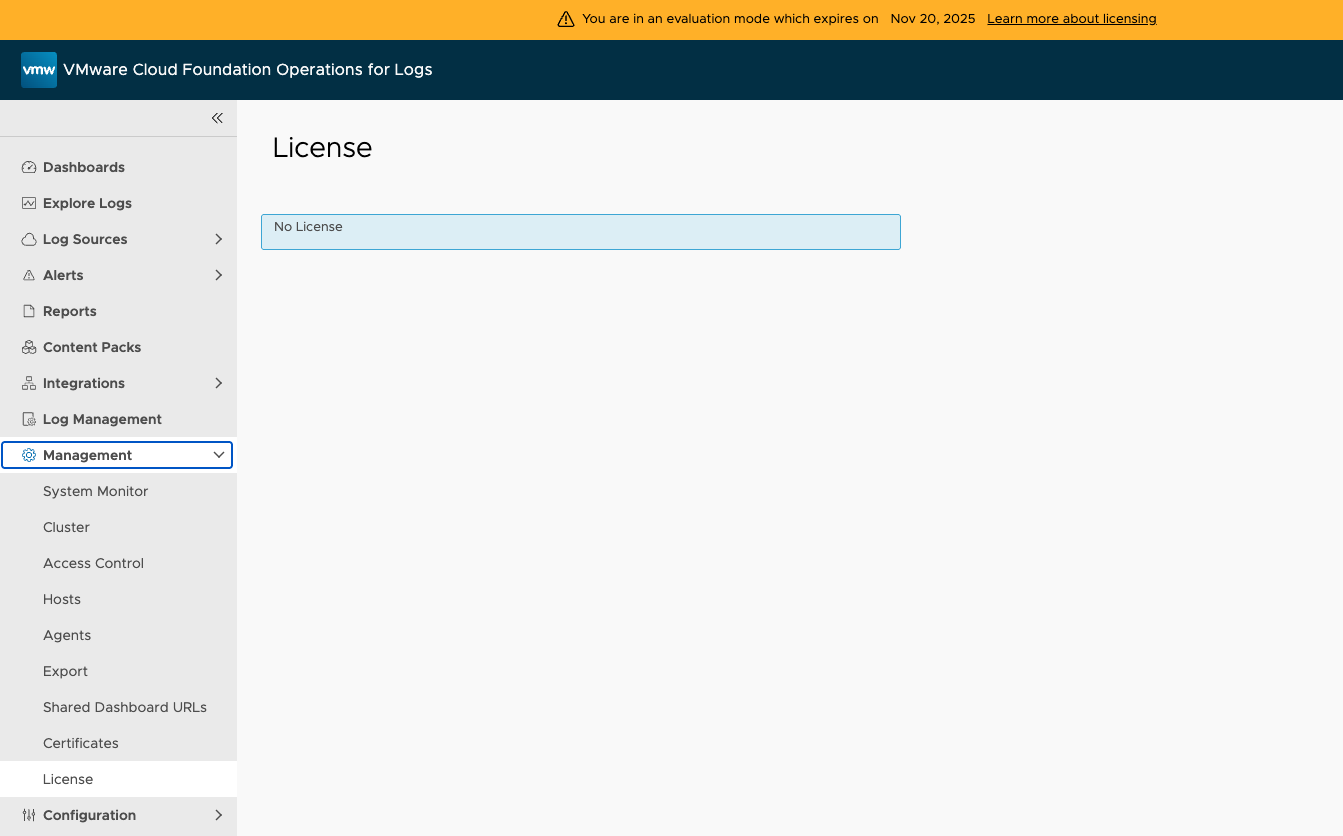
After some digging I found this KB. Right at the bottom it says “If you have vCenter servers on V8.0 which is licensed correctly with VCF/VVF license this is expected behavior.”

Which means licensing through VCF Operations only works once vCenter is upgraded to 9.0. Until then, VCF Operations for Logs stays in evaluation mode.

What this says about VCF Operations

With the release of VMware Cloud Foundation 9.0, VCF Operations went from an optional add-on to a core component. Everything now runs through it.

Trouble or questions? Get in touch.
You might also like