ESX 9.0 NVMe Memory Tiering
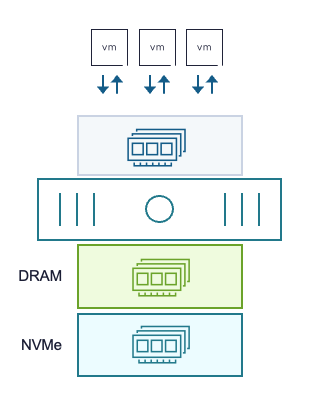
The NVMe memory tiering feature in ESX lets local NVMe SSDs be used as RAM, so cheap NVMe devices carry workload memory instead of expensive DRAM.

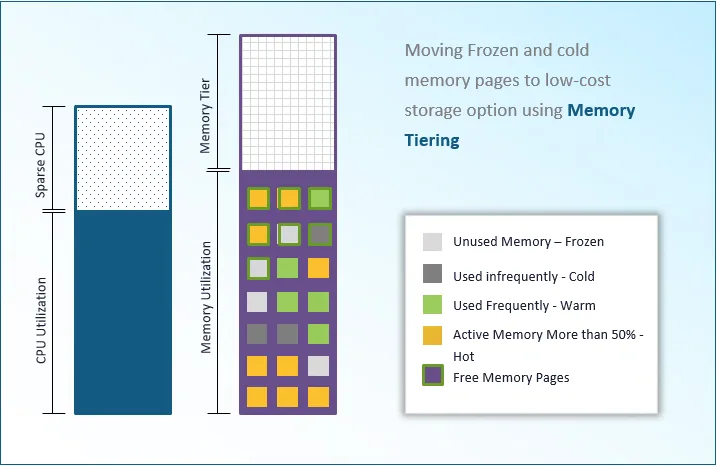
The NVMe memory tiering feature in ESX lets local NVMe SSDs be used as RAM, so cheap NVMe devices can carry workload memory instead of expensive DRAM. VMware calls the NVMe tier tier 1 memory, with DRAM as tier 0.
NVMe memory tiering in brief
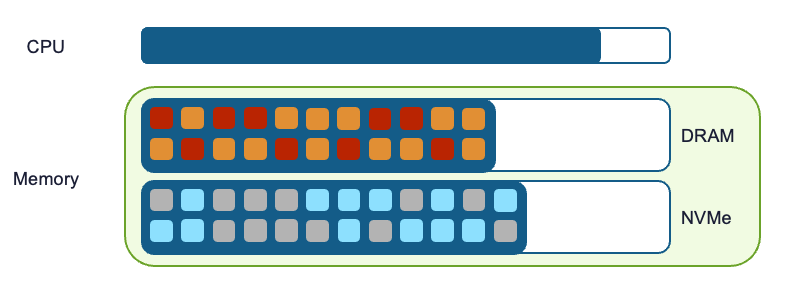
- Local NVMe SSDs used as memory
- Configured per ESXi host, so hosts with and without NVMe tiering can coexist in a cluster
- Configurable from 25% to 400% of the host’s DRAM
Example: a host with 128 GB of DRAM
NVMe tiering is enabled with esxcli.
esxcli system settings kernel set -s MemoryTiering -v TRUENow we need a local NVMe SSD and its exact identifier.
 [root@hades:~] esxcli storage core device partition list
Device Partition Start Sector End Sector Type Size
-------------------------------------------------------------------- --------- ------------ ---------- ---- -------------
t10.NVMe____Samsung_SSD_990_EVO_Plus_2TB____________755B42415C382500 0 0 3907029167 0 2000398934016
mpx.vmhba33:C0:T0:L0 0 0 976773167 0 500107862016
mpx.vmhba33:C0:T0:L0 1 2048 976768064 fb 500104200704
mpx.vmhba32:C0:T0:L0 0 0 30283007 0 15504900096
mpx.vmhba32:C0:T0:L0 1 64 204863 0 104857600
mpx.vmhba32:C0:T0:L0 5 208896 2306047 6 1073741824
mpx.vmhba32:C0:T0:L0 6 2308096 4405247 6 1073741824
mpx.vmhba32:C0:T0:L0 7 4407296 30282974 f8 13248347648
t10.NVMe____Samsung_SSD_990_EVO_Plus_2TB____________7D5B42415C382500 0 0 3907029167 0 2000398934016
Creating the NVMe tier:
esxcli system tierdevice create -d /vmfs/devices/disks/t10.NVMe____Samsung_SSD_990_EVO_Plus_2TB____________7D5B42415C382500Then we set the percentage of host memory to take from the NVMe disk. In our case the full 400%. (Best practice is a 1:1 ratio.)
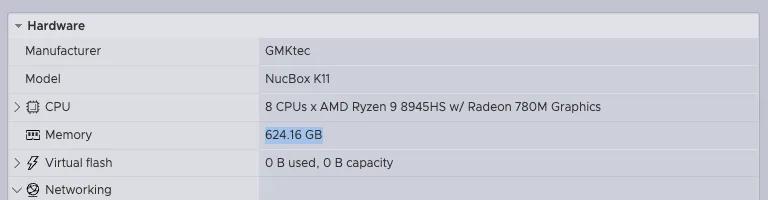
esxcli system settings advanced set -o /Mem/TierNvmePct -i 400The host then needs a restart. After it, our host has roughly 624 GB of memory.
Choosing the NVMe device
SSDs for NVMe tiering have to be listed on the Broadcom Compatibility Guide (BCG) and meet these specifications:
- vSAN SSD
- Device type: NVMe
- Endurance class: class D, at least 7300 TBW
- Performance class: class F (100,000 to 349,999 writes per second) or class G
Other important points:
- 4 TB maximum size
- NVMe-over-Fabric is not supported; the NVMe SSD has to be connected directly in the host
- An NVMe SSD configured as a memory tier can no longer be used for VMFS or vSAN datastores
- Only hardware RAID is supported
Which workloads suit NVMe tiering?
NVMe tiering suits essentially any workload. ESX only moves cold and very cold pages onto the NVMe device; hot pages always stay in DRAM. Features such as vMotion and DRS are fully supported. VDI and database workloads suit it particularly well.
Best practice is a 1:1 ratio, for example 1 TB of DRAM and 2x1 TB NVMe SSD (RAID1) for tiering.
These workloads are not supported:
- Nested virtualisation
- Monster VMs with 1 TB of RAM and 128 vCPUs
- VMs with fault tolerance enabled
Put differently, VMs with these vmx settings:
- sched.cpu.latencySensitivity = “high”
- SEV VM: sev.enable = “True”
- SGX VM: sgxInfo.epcSize is non-zero
- TDX VM: tdx.enable = “True”
- ftcpt.enabled = “True”
- vhv.enable = “True”
What NVMe tiering gains you
Beyond the obvious, that NVMe is cheaper, there are further gains:
- Host density goes up and the CPU gets used better
- On a database cluster you can provision more workload, which can also reduce the licence cost of something like MS SQL Server, licensed per socket
- A single-socket ESX host with an NVMe tier gets you more total memory