

build 6ddc7a35 | content blog-content@417154f · 338 posts | profiles 32 · corpus 315 | ● 0 skipped | format run

$ soultec get post/changing-default-backup-location-for-mssql-database -o yaml$ soultec get post/changing-default-backup-location-for-mssql-database -o json$ soultec get post/changing-default-backup-location-for-mssql-database -o toml$ soultec get post/changing-default-backup-location-for-mssql-database -o xml$ python3 changing-default-backup-location-for-mssql-database.pyPS> ./changing-default-backup-location-for-mssql-database.ps1$ go run changing-default-backup-location-for-mssql-database.go$ node changing-default-backup-location-for-mssql-database.js

apiVersion: soultec.ch/v1kind: Postmetadata: name: changing-default-backup-location-for-mssql-database locale: en labels: author: dario-doerflinger series: community capability/backup-recovery: 2.14 vendor/vmware: 0.98 annotations: source: blog-content/posts/en/changing-default-backup-location-for-mssql-database.md route: /en/insights/changing-default-backup-location-for-mssql-database/ schema: /nerd/schema/posts.json markdown: /en/insights/changing-default-backup-location-for-mssql-database.mdspec: title: Changing default Backup location for MSSQL database date: 2018-09-21 author: dario-doerflinger locale: en summary: Just yesterday I upgraded Zerto from 6.0 U2 to 6.5 at a customer site. capabilities: [backup-recovery] vendors: [vmware] series: community legacySlug: changing-default-backup-location-for-mssql-database migrated: 2026-08-24 draft: false sections: - body: | Just yesterday I upgraded Zerto from 6.0 U2 to 6.5 at a customer site. The customer had several different Zerto Virtual Manager (ZVM) instances and one of which was isolated from the rest of the network in a secured zone. The upgrade process failed right at the time when the upgrade process tried to backup the Zerto SQL database: ![error](/blog-assets/changing-default-backup-location-for-mssql-database/01.webp) > An error has occurred. > Package : Zerto Virtual Replication Error : 1: DatabaseCustomActions.ZvmBackupDatabase 2: Cannot open backup device 'BACKUP DEVICE\\zvm\_storage\_TIMESTAMP.bak'. Operating system error 53(The network path was not found.). > BACKUP DATABASE is terminating abnormally. At first I figured this must be a setting in Zerto. However I found no such setting and turned my attention to the SQL server. After some research I found the culprit: The default backup location was set to the company's default share for SQL backups. This share however was not accessible from that isolated environment. The solution was to reconfigure the default backup location on the sql server and after that the upgrade succeeded. Here are the steps to change the default backup setting in a MS SQL instance: 1\. Start SQL Server Management Studio (SSMS) and connect to your database server ![manager](/blog-assets/changing-default-backup-location-for-mssql-database/02.webp) 2\. Open the properties of the server instance (not the database itself): ![properties](/blog-assets/changing-default-backup-location-for-mssql-database/03.webp) 3\. Choose the "Database Settings" and change the default location for Backup: ![backupsettings](/blog-assets/changing-default-backup-location-for-mssql-database/04.webp) I hope this helps someone down the road.status: corpus: 315 alsoLike: - {ref: posts/how-to-disaster-recovery-mit-vmware-live-cyber-recovery, score: 1.00} - {ref: posts/success-story-zerto-and-coop-switzerland, score: 1.00} - {ref: solutions/vmware/vmware-cloud-foundation/addon/site-recovery-manager, score: 0.72} search: /en/search.json
{ "apiVersion": "soultec.ch/v1", "kind": "Post", "metadata": { "name": "changing-default-backup-location-for-mssql-database", "locale": "en", "labels": { "author": "dario-doerflinger", "series": "community", "capability/backup-recovery": 2.14, "vendor/vmware": 0.98 }, "annotations": { "source": "blog-content/posts/en/changing-default-backup-location-for-mssql-database.md", "route": "/en/insights/changing-default-backup-location-for-mssql-database/", "schema": "/nerd/schema/posts.json", "markdown": "/en/insights/changing-default-backup-location-for-mssql-database.md" } }, "spec": { "title": "Changing default Backup location for MSSQL database", "date": "2018-09-21", "author": "dario-doerflinger", "locale": "en", "summary": "Just yesterday I upgraded Zerto from 6.0 U2 to 6.5 at a customer site.", "capabilities": [ "backup-recovery" ], "vendors": [ "vmware" ], "series": "community", "legacySlug": "changing-default-backup-location-for-mssql-database", "migrated": "2026-08-24", "draft": false, "sections": [ { "body": "Just yesterday I upgraded Zerto from 6.0 U2 to 6.5 at a customer site. The customer had several different Zerto Virtual Manager (ZVM) instances and one of which was isolated from the rest of the network in a secured zone.\n\nThe upgrade process failed right at the time when the upgrade process tried to backup the Zerto SQL database:\n\n![error](/blog-assets/changing-default-backup-location-for-mssql-database/01.webp)\n\n> An error has occurred. \n> Package : Zerto Virtual Replication Error : 1: DatabaseCustomActions.ZvmBackupDatabase 2: Cannot open backup device 'BACKUP DEVICE\\\\zvm\\_storage\\_TIMESTAMP.bak'. Operating system error 53(The network path was not found.). \n> BACKUP DATABASE is terminating abnormally.\n\nAt first I figured this must be a setting in Zerto. However I found no such setting and turned my attention to the SQL server. After some research I found the culprit: The default backup location was set to the company's default share for SQL backups. This share however was not accessible from that isolated environment. The solution was to reconfigure the default backup location on the sql server and after that the upgrade succeeded.\n\nHere are the steps to change the default backup setting in a MS SQL instance:\n\n1\\. Start SQL Server Management Studio (SSMS) and connect to your database server\n\n![manager](/blog-assets/changing-default-backup-location-for-mssql-database/02.webp)\n\n2\\. Open the properties of the server instance (not the database itself):\n\n![properties](/blog-assets/changing-default-backup-location-for-mssql-database/03.webp)\n\n3\\. Choose the \"Database Settings\" and change the default location for Backup:\n\n![backupsettings](/blog-assets/changing-default-backup-location-for-mssql-database/04.webp)\n\nI hope this helps someone down the road." } ] }, "status": { "corpus": 315, "alsoLike": [ { "ref": "posts/how-to-disaster-recovery-mit-vmware-live-cyber-recovery", "score": "1.00" }, { "ref": "posts/success-story-zerto-and-coop-switzerland", "score": "1.00" }, { "ref": "solutions/vmware/vmware-cloud-foundation/addon/site-recovery-manager", "score": "0.72" } ], "search": "/en/search.json" }}
apiVersion = "soultec.ch/v1"kind = "Post"[metadata]name = "changing-default-backup-location-for-mssql-database"locale = "en"[metadata.labels]author = "dario-doerflinger"series = "community""capability/backup-recovery" = 2.14"vendor/vmware" = 0.98[metadata.annotations]source = "blog-content/posts/en/changing-default-backup-location-for-mssql-database.md"route = "/en/insights/changing-default-backup-location-for-mssql-database/"schema = "/nerd/schema/posts.json"markdown = "/en/insights/changing-default-backup-location-for-mssql-database.md"[spec]title = "Changing default Backup location for MSSQL database"date = 2018-09-21author = "dario-doerflinger"locale = "en"summary = "Just yesterday I upgraded Zerto from 6.0 U2 to 6.5 at a customer site."capabilities = ["backup-recovery"]vendors = ["vmware"]series = "community"legacySlug = "changing-default-backup-location-for-mssql-database"migrated = 2026-08-24draft = false[[spec.sections]]body = '''Just yesterday I upgraded Zerto from 6.0 U2 to 6.5 at a customer site. The customer had several different Zerto Virtual Manager (ZVM) instances and one of which was isolated from the rest of the network in a secured zone.The upgrade process failed right at the time when the upgrade process tried to backup the Zerto SQL database:![error](/blog-assets/changing-default-backup-location-for-mssql-database/01.webp)> An error has occurred. > Package : Zerto Virtual Replication Error : 1: DatabaseCustomActions.ZvmBackupDatabase 2: Cannot open backup device 'BACKUP DEVICE\\zvm\_storage\_TIMESTAMP.bak'. Operating system error 53(The network path was not found.). > BACKUP DATABASE is terminating abnormally.At first I figured this must be a setting in Zerto. However I found no such setting and turned my attention to the SQL server. After some research I found the culprit: The default backup location was set to the company's default share for SQL backups. This share however was not accessible from that isolated environment. The solution was to reconfigure the default backup location on the sql server and after that the upgrade succeeded.Here are the steps to change the default backup setting in a MS SQL instance:1\. Start SQL Server Management Studio (SSMS) and connect to your database server![manager](/blog-assets/changing-default-backup-location-for-mssql-database/02.webp)2\. Open the properties of the server instance (not the database itself):![properties](/blog-assets/changing-default-backup-location-for-mssql-database/03.webp)3\. Choose the "Database Settings" and change the default location for Backup:![backupsettings](/blog-assets/changing-default-backup-location-for-mssql-database/04.webp)I hope this helps someone down the road.'''[status]corpus = 315search = "/en/search.json"[[status.alsoLike]]ref = "posts/how-to-disaster-recovery-mit-vmware-live-cyber-recovery"score = "1.00"[[status.alsoLike]]ref = "posts/success-story-zerto-and-coop-switzerland"score = "1.00"[[status.alsoLike]]ref = "solutions/vmware/vmware-cloud-foundation/addon/site-recovery-manager"score = "0.72"
<?xml version="1.0" encoding="UTF-8"?><manifest kind="Post"> <apiVersion>soultec.ch/v1</apiVersion> <metadata> <name>changing-default-backup-location-for-mssql-database</name> <locale>en</locale> <labels> <author>dario-doerflinger</author> <series>community</series> <entry key="capability/backup-recovery">2.14</entry> <entry key="vendor/vmware">0.98</entry> </labels> <annotations> <source>blog-content/posts/en/changing-default-backup-location-for-mssql-database.md</source> <route>/en/insights/changing-default-backup-location-for-mssql-database/</route> <schema>/nerd/schema/posts.json</schema> <markdown>/en/insights/changing-default-backup-location-for-mssql-database.md</markdown> </annotations> </metadata> <spec> <title>Changing default Backup location for MSSQL database</title> <date>2018-09-21</date> <author>dario-doerflinger</author> <locale>en</locale> <summary>Just yesterday I upgraded Zerto from 6.0 U2 to 6.5 at a customer site.</summary> <capabilities> <item>backup-recovery</item> </capabilities> <vendors> <item>vmware</item> </vendors> <series>community</series> <legacySlug>changing-default-backup-location-for-mssql-database</legacySlug> <migrated>2026-08-24</migrated> <draft>false</draft> <sections> <section> <body>Just yesterday I upgraded Zerto from 6.0 U2 to 6.5 at a customer site. The customer had several different Zerto Virtual Manager (ZVM) instances and one of which was isolated from the rest of the network in a secured zone.The upgrade process failed right at the time when the upgrade process tried to backup the Zerto SQL database:![error](/blog-assets/changing-default-backup-location-for-mssql-database/01.webp)&gt; An error has occurred. &gt; Package : Zerto Virtual Replication Error : 1: DatabaseCustomActions.ZvmBackupDatabase 2: Cannot open backup device 'BACKUP DEVICE\\zvm\_storage\_TIMESTAMP.bak'. Operating system error 53(The network path was not found.). &gt; BACKUP DATABASE is terminating abnormally.At first I figured this must be a setting in Zerto. However I found no such setting and turned my attention to the SQL server. After some research I found the culprit: The default backup location was set to the company's default share for SQL backups. This share however was not accessible from that isolated environment. The solution was to reconfigure the default backup location on the sql server and after that the upgrade succeeded.Here are the steps to change the default backup setting in a MS SQL instance:1\. Start SQL Server Management Studio (SSMS) and connect to your database server![manager](/blog-assets/changing-default-backup-location-for-mssql-database/02.webp)2\. Open the properties of the server instance (not the database itself):![properties](/blog-assets/changing-default-backup-location-for-mssql-database/03.webp)3\. Choose the "Database Settings" and change the default location for Backup:![backupsettings](/blog-assets/changing-default-backup-location-for-mssql-database/04.webp)I hope this helps someone down the road. </body> </section> </sections> </spec> <status> <corpus>315</corpus> <alsoLike> <item> <ref>posts/how-to-disaster-recovery-mit-vmware-live-cyber-recovery</ref> <score>1.00</score> </item> <item> <ref>posts/success-story-zerto-and-coop-switzerland</ref> <score>1.00</score> </item> <item> <ref>solutions/vmware/vmware-cloud-foundation/addon/site-recovery-manager</ref> <score>0.72</score> </item> </alsoLike> <search>/en/search.json</search> </status></manifest>
# Code generated by the soultec.ch build. DO NOT EDIT.import jsonPAGE = { "apiVersion": "soultec.ch/v1", "kind": "Post", "metadata": { "name": "changing-default-backup-location-for-mssql-database", "locale": "en", "labels": { "author": "dario-doerflinger", "series": "community", "capability/backup-recovery": 2.14, "vendor/vmware": 0.98, }, "annotations": { "source": "blog-content/posts/en/changing-default-backup-location-for-mssql-database.md", "route": "/en/insights/changing-default-backup-location-for-mssql-database/", "schema": "/nerd/schema/posts.json", "markdown": "/en/insights/changing-default-backup-location-for-mssql-database.md", }, }, "spec": { "title": "Changing default Backup location for MSSQL database", "date": "2018-09-21", "author": "dario-doerflinger", "locale": "en", "summary": "Just yesterday I upgraded Zerto from 6.0 U2 to 6.5 at a customer site.", "capabilities": ["backup-recovery"], "vendors": ["vmware"], "series": "community", "legacySlug": "changing-default-backup-location-for-mssql-database", "migrated": "2026-08-24", "draft": False, "sections": [ { "body": ( "Just yesterday I upgraded Zerto from 6.0 U2 to 6.5 at a customer site. The customer had several different Zerto Virtual Manager (ZVM) instances and one of which was isolated from the rest of the network in a secured zone.\n" "\n" "The upgrade process failed right at the time when the upgrade process tried to backup the Zerto SQL database:\n" "\n" "![error](/blog-assets/changing-default-backup-location-for-mssql-database/01.webp)\n" "\n" "> An error has occurred. \n" "> Package : Zerto Virtual Replication Error : 1: DatabaseCustomActions.ZvmBackupDatabase 2: Cannot open backup device 'BACKUP DEVICE\\\\zvm\\_storage\\_TIMESTAMP.bak'. Operating system error 53(The network path was not found.). \n" "> BACKUP DATABASE is terminating abnormally.\n" "\n" "At first I figured this must be a setting in Zerto. However I found no such setting and turned my attention to the SQL server. After some research I found the culprit: The default backup location was set to the company's default share for SQL backups. This share however was not accessible from that isolated environment. The solution was to reconfigure the default backup location on the sql server and after that the upgrade succeeded.\n" "\n" "Here are the steps to change the default backup setting in a MS SQL instance:\n" "\n" "1\\. Start SQL Server Management Studio (SSMS) and connect to your database server\n" "\n" "![manager](/blog-assets/changing-default-backup-location-for-mssql-database/02.webp)\n" "\n" "2\\. Open the properties of the server instance (not the database itself):\n" "\n" "![properties](/blog-assets/changing-default-backup-location-for-mssql-database/03.webp)\n" "\n" "3\\. Choose the \"Database Settings\" and change the default location for Backup:\n" "\n" "![backupsettings](/blog-assets/changing-default-backup-location-for-mssql-database/04.webp)\n" "\n" "I hope this helps someone down the road." ), }, ], }, "status": { "corpus": 315, "alsoLike": [ { "ref": "posts/how-to-disaster-recovery-mit-vmware-live-cyber-recovery", "score": "1.00", }, { "ref": "posts/success-story-zerto-and-coop-switzerland", "score": "1.00", }, { "ref": "solutions/vmware/vmware-cloud-foundation/addon/site-recovery-manager", "score": "0.72", }, ], "search": "/en/search.json", },}if __name__ == "__main__": print(json.dumps(PAGE, indent=2, ensure_ascii=False))
# Code generated by the soultec.ch build. DO NOT EDIT.$Page = [ordered]@{ apiVersion = 'soultec.ch/v1' kind = 'Post' metadata = [ordered]@{ name = 'changing-default-backup-location-for-mssql-database' locale = 'en' labels = [ordered]@{ author = 'dario-doerflinger' series = 'community' 'capability/backup-recovery' = 2.14 'vendor/vmware' = 0.98 } annotations = [ordered]@{ source = 'blog-content/posts/en/changing-default-backup-location-for-mssql-database.md' route = '/en/insights/changing-default-backup-location-for-mssql-database/' schema = '/nerd/schema/posts.json' markdown = '/en/insights/changing-default-backup-location-for-mssql-database.md' } } spec = [ordered]@{ title = 'Changing default Backup location for MSSQL database' date = '2018-09-21' author = 'dario-doerflinger' locale = 'en' summary = 'Just yesterday I upgraded Zerto from 6.0 U2 to 6.5 at a customer site.' capabilities = @('backup-recovery') vendors = @('vmware') series = 'community' legacySlug = 'changing-default-backup-location-for-mssql-database' migrated = '2026-08-24' draft = $false sections = @( [ordered]@{ body = @'Just yesterday I upgraded Zerto from 6.0 U2 to 6.5 at a customer site. The customer had several different Zerto Virtual Manager (ZVM) instances and one of which was isolated from the rest of the network in a secured zone.The upgrade process failed right at the time when the upgrade process tried to backup the Zerto SQL database:![error](/blog-assets/changing-default-backup-location-for-mssql-database/01.webp)> An error has occurred. > Package : Zerto Virtual Replication Error : 1: DatabaseCustomActions.ZvmBackupDatabase 2: Cannot open backup device 'BACKUP DEVICE\\zvm\_storage\_TIMESTAMP.bak'. Operating system error 53(The network path was not found.). > BACKUP DATABASE is terminating abnormally.At first I figured this must be a setting in Zerto. However I found no such setting and turned my attention to the SQL server. After some research I found the culprit: The default backup location was set to the company's default share for SQL backups. This share however was not accessible from that isolated environment. The solution was to reconfigure the default backup location on the sql server and after that the upgrade succeeded.Here are the steps to change the default backup setting in a MS SQL instance:1\. Start SQL Server Management Studio (SSMS) and connect to your database server![manager](/blog-assets/changing-default-backup-location-for-mssql-database/02.webp)2\. Open the properties of the server instance (not the database itself):![properties](/blog-assets/changing-default-backup-location-for-mssql-database/03.webp)3\. Choose the "Database Settings" and change the default location for Backup:![backupsettings](/blog-assets/changing-default-backup-location-for-mssql-database/04.webp)I hope this helps someone down the road.'@ } ) } status = [ordered]@{ corpus = 315 alsoLike = @( [ordered]@{ ref = 'posts/how-to-disaster-recovery-mit-vmware-live-cyber-recovery' score = '1.00' } [ordered]@{ ref = 'posts/success-story-zerto-and-coop-switzerland' score = '1.00' } [ordered]@{ ref = 'solutions/vmware/vmware-cloud-foundation/addon/site-recovery-manager' score = '0.72' } ) search = '/en/search.json' }}$Page | ConvertTo-Json -Depth 32
// Code generated by the soultec.ch build. DO NOT EDIT.package mainimport ( "encoding/json" "os")var page = map[string]any{ "apiVersion": "soultec.ch/v1", "kind": "Post", "metadata": map[string]any{ "name": "changing-default-backup-location-for-mssql-database", "locale": "en", "labels": map[string]any{ "author": "dario-doerflinger", "series": "community", "capability/backup-recovery": 2.14, "vendor/vmware": 0.98, }, "annotations": map[string]any{ "source": "blog-content/posts/en/changing-default-backup-location-for-mssql-database.md", "route": "/en/insights/changing-default-backup-location-for-mssql-database/", "schema": "/nerd/schema/posts.json", "markdown": "/en/insights/changing-default-backup-location-for-mssql-database.md", }, }, "spec": map[string]any{ "title": "Changing default Backup location for MSSQL database", "date": "2018-09-21", "author": "dario-doerflinger", "locale": "en", "summary": "Just yesterday I upgraded Zerto from 6.0 U2 to 6.5 at a customer site.", "capabilities": []any{"backup-recovery"}, "vendors": []any{"vmware"}, "series": "community", "legacySlug": "changing-default-backup-location-for-mssql-database", "migrated": "2026-08-24", "draft": false, "sections": []any{ map[string]any{ "body": "Just yesterday I upgraded Zerto from 6.0 U2 to 6.5 at a customer site. The customer had several different Zerto Virtual Manager (ZVM) instances and one of which was isolated from the rest of the network in a secured zone.\n" + "\n" + "The upgrade process failed right at the time when the upgrade process tried to backup the Zerto SQL database:\n" + "\n" + "![error](/blog-assets/changing-default-backup-location-for-mssql-database/01.webp)\n" + "\n" + "> An error has occurred. \n" + "> Package : Zerto Virtual Replication Error : 1: DatabaseCustomActions.ZvmBackupDatabase 2: Cannot open backup device 'BACKUP DEVICE\\\\zvm\\_storage\\_TIMESTAMP.bak'. Operating system error 53(The network path was not found.). \n" + "> BACKUP DATABASE is terminating abnormally.\n" + "\n" + "At first I figured this must be a setting in Zerto. However I found no such setting and turned my attention to the SQL server. After some research I found the culprit: The default backup location was set to the company's default share for SQL backups. This share however was not accessible from that isolated environment. The solution was to reconfigure the default backup location on the sql server and after that the upgrade succeeded.\n" + "\n" + "Here are the steps to change the default backup setting in a MS SQL instance:\n" + "\n" + "1\\. Start SQL Server Management Studio (SSMS) and connect to your database server\n" + "\n" + "![manager](/blog-assets/changing-default-backup-location-for-mssql-database/02.webp)\n" + "\n" + "2\\. Open the properties of the server instance (not the database itself):\n" + "\n" + "![properties](/blog-assets/changing-default-backup-location-for-mssql-database/03.webp)\n" + "\n" + "3\\. Choose the \"Database Settings\" and change the default location for Backup:\n" + "\n" + "![backupsettings](/blog-assets/changing-default-backup-location-for-mssql-database/04.webp)\n" + "\n" + "I hope this helps someone down the road.", }, }, }, "status": map[string]any{ "corpus": 315, "alsoLike": []any{ map[string]any{ "ref": "posts/how-to-disaster-recovery-mit-vmware-live-cyber-recovery", "score": "1.00", }, map[string]any{ "ref": "posts/success-story-zerto-and-coop-switzerland", "score": "1.00", }, map[string]any{ "ref": "solutions/vmware/vmware-cloud-foundation/addon/site-recovery-manager", "score": "0.72", }, }, "search": "/en/search.json", },}func main() { enc := json.NewEncoder(os.Stdout) enc.SetEscapeHTML(false) enc.SetIndent("", " ") if err := enc.Encode(page); err != nil { os.Exit(1) }}
// Code generated by the soultec.ch build. DO NOT EDIT.const page = { apiVersion: "soultec.ch/v1", kind: "Post", metadata: { name: "changing-default-backup-location-for-mssql-database", locale: "en", labels: { author: "dario-doerflinger", series: "community", "capability/backup-recovery": 2.14, "vendor/vmware": 0.98, }, annotations: { source: "blog-content/posts/en/changing-default-backup-location-for-mssql-database.md", route: "/en/insights/changing-default-backup-location-for-mssql-database/", schema: "/nerd/schema/posts.json", markdown: "/en/insights/changing-default-backup-location-for-mssql-database.md", }, }, spec: { title: "Changing default Backup location for MSSQL database", date: "2018-09-21", author: "dario-doerflinger", locale: "en", summary: "Just yesterday I upgraded Zerto from 6.0 U2 to 6.5 at a customer site.", capabilities: ["backup-recovery"], vendors: ["vmware"], series: "community", legacySlug: "changing-default-backup-location-for-mssql-database", migrated: "2026-08-24", draft: false, sections: [ { body: "Just yesterday I upgraded Zerto from 6.0 U2 to 6.5 at a customer site. The customer had several different Zerto Virtual Manager (ZVM) instances and one of which was isolated from the rest of the network in a secured zone.\n" + "\n" + "The upgrade process failed right at the time when the upgrade process tried to backup the Zerto SQL database:\n" + "\n" + "![error](/blog-assets/changing-default-backup-location-for-mssql-database/01.webp)\n" + "\n" + "> An error has occurred. \n" + "> Package : Zerto Virtual Replication Error : 1: DatabaseCustomActions.ZvmBackupDatabase 2: Cannot open backup device 'BACKUP DEVICE\\\\zvm\\_storage\\_TIMESTAMP.bak'. Operating system error 53(The network path was not found.). \n" + "> BACKUP DATABASE is terminating abnormally.\n" + "\n" + "At first I figured this must be a setting in Zerto. However I found no such setting and turned my attention to the SQL server. After some research I found the culprit: The default backup location was set to the company's default share for SQL backups. This share however was not accessible from that isolated environment. The solution was to reconfigure the default backup location on the sql server and after that the upgrade succeeded.\n" + "\n" + "Here are the steps to change the default backup setting in a MS SQL instance:\n" + "\n" + "1\\. Start SQL Server Management Studio (SSMS) and connect to your database server\n" + "\n" + "![manager](/blog-assets/changing-default-backup-location-for-mssql-database/02.webp)\n" + "\n" + "2\\. Open the properties of the server instance (not the database itself):\n" + "\n" + "![properties](/blog-assets/changing-default-backup-location-for-mssql-database/03.webp)\n" + "\n" + "3\\. Choose the \"Database Settings\" and change the default location for Backup:\n" + "\n" + "![backupsettings](/blog-assets/changing-default-backup-location-for-mssql-database/04.webp)\n" + "\n" + "I hope this helps someone down the road.", }, ], }, status: { corpus: 315, alsoLike: [ { ref: "posts/how-to-disaster-recovery-mit-vmware-live-cyber-recovery", score: "1.00", }, { ref: "posts/success-story-zerto-and-coop-switzerland", score: "1.00", }, { ref: "solutions/vmware/vmware-cloud-foundation/addon/site-recovery-manager", score: "0.72", }, ], search: "/en/search.json", },};console.log(JSON.stringify(page, null, 2));

# 63 lines · YAML · validated at build# 60 lines · JSON · validated at build# 78 lines · TOML · validated at build# 88 lines · XML · validated at build# 90 lines · Python · read back at build, equals the JSON record# 87 lines · PowerShell · read back at build, equals the JSON record# 100 lines · Go · read back at build, equals the JSON record# 85 lines · JavaScript · read back at build, equals the JSON record · served at /en/insights/changing-default-backup-location-for-mssql-database.md

Community · 2018-09-21

Changing default Backup location for MSSQL database

Just yesterday I upgraded Zerto from 6.0 U2 to 6.5 at a customer site.

2018-09-21Date
Dario DörflingerAuthor
1Min read
Vendors VMware 0.98

This post is from 2018. It stays online because people still look for it, but it describes the products as they were then.

Just yesterday I upgraded Zerto from 6.0 U2 to 6.5 at a customer site. The customer had several different Zerto Virtual Manager (ZVM) instances and one of which was isolated from the rest of the network in a secured zone.

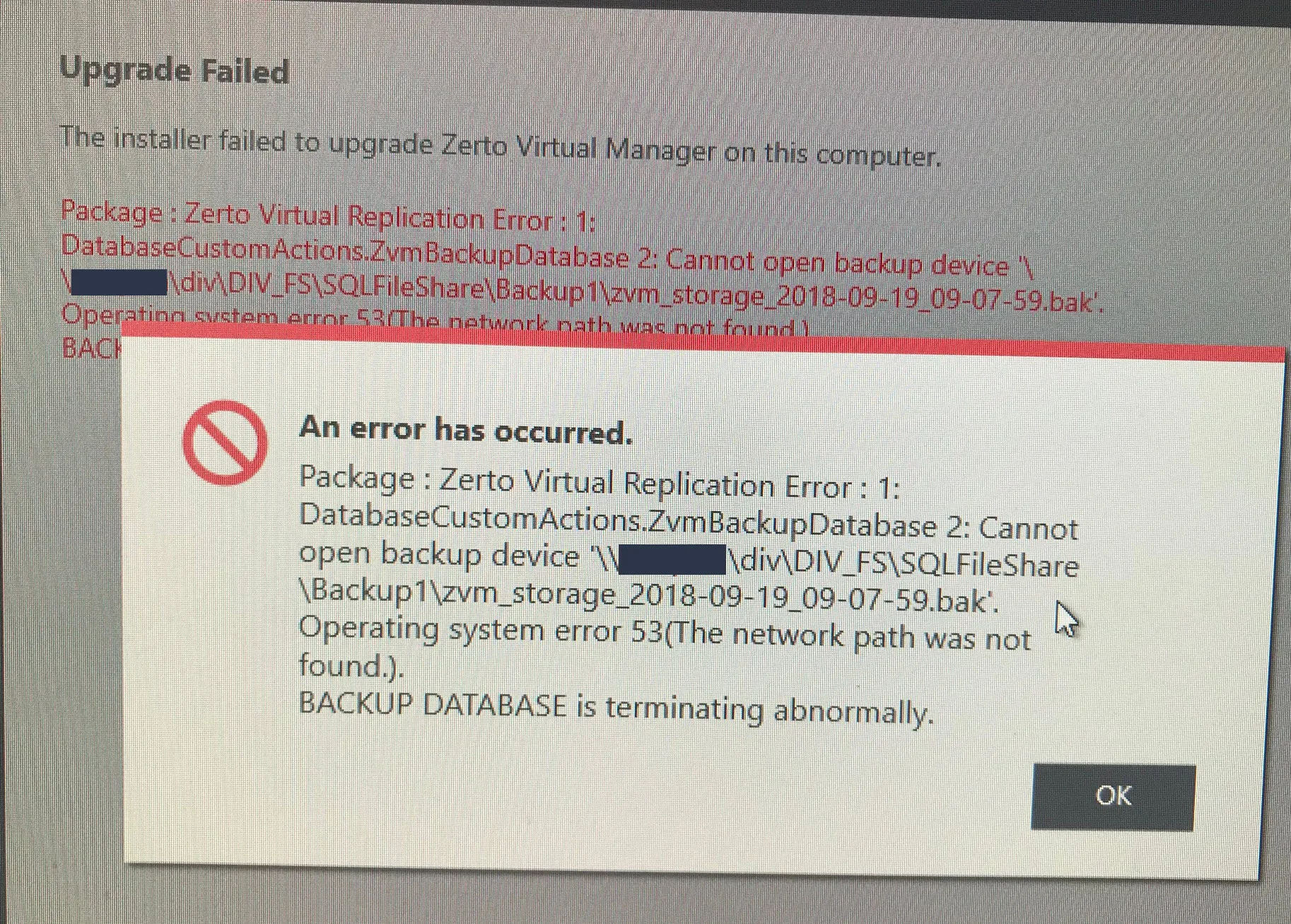
The upgrade process failed right at the time when the upgrade process tried to backup the Zerto SQL database:
error

An error has occurred.
Package : Zerto Virtual Replication Error : 1: DatabaseCustomActions.ZvmBackupDatabase 2: Cannot open backup device ‘BACKUP DEVICE\zvm_storage_TIMESTAMP.bak’. Operating system error 53(The network path was not found.).
BACKUP DATABASE is terminating abnormally.

At first I figured this must be a setting in Zerto. However I found no such setting and turned my attention to the SQL server. After some research I found the culprit: The default backup location was set to the company’s default share for SQL backups. This share however was not accessible from that isolated environment. The solution was to reconfigure the default backup location on the sql server and after that the upgrade succeeded.

Here are the steps to change the default backup setting in a MS SQL instance:

1. Start SQL Server Management Studio (SSMS) and connect to your database server
manager

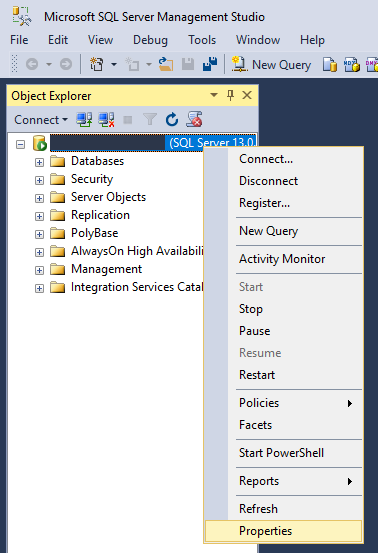
2. Open the properties of the server instance (not the database itself):
properties

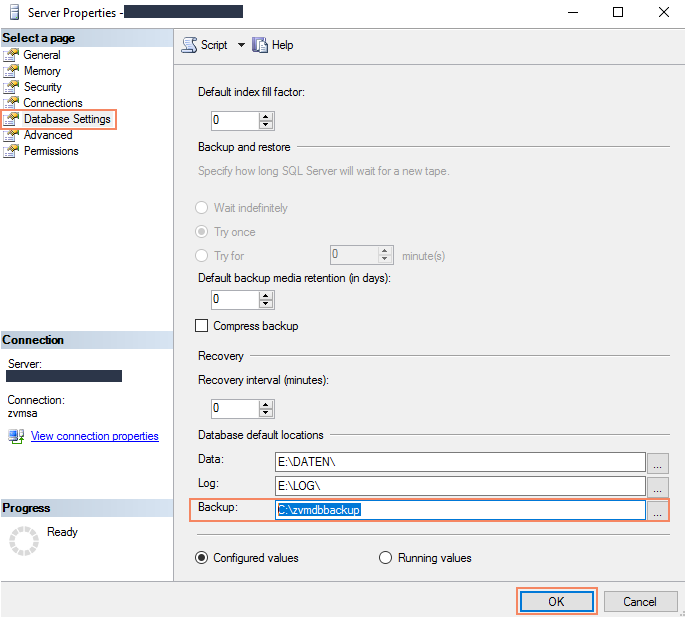
3. Choose the “Database Settings” and change the default location for Backup:
backupsettings

I hope this helps someone down the road.
You might also like