Secure backups with Blocky for Veeam
Backup data is generally treated as the last line of defence, which makes protecting it properly that much more important.
This post is from 2022. It stays online because people still look for it, but it describes the products as they were then.
Backup data is generally treated as the last line of defence. That makes protecting it properly all the more important. By now everyone knows someone who has been hit by a ransomware incident. Ransomware is a fact we have to live with, and one to take deliberate countermeasures against.
The backup repository server
A central component in data protection is the repository server, where the backup data lives. That makes it, and the data on it, a target. A Windows Server repository server offers little out of the box to prevent backup data being altered or deleted unintentionally.
Alongside the familiar Windows Veeam backup repository there are various products on the market that make backup data immutable.
But what if your backup storage is not due for replacement yet?
Wondering how to better protect a Windows repository server that is already full?
The answer is Blocky for Veeam. Built on application whitelisting, it suits protecting existing, already written Windows volumes. Blocky supports the current Windows Server versions with NTFS or ReFS volumes. For whitelisting, Blocky takes a fingerprint of every process and blocks write access if that fingerprint is not explicitly permitted for the process. Unauthorised access attempts are recorded and reported in real time.
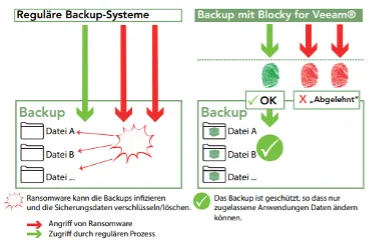
How does Blocky for Veeam work?
Blocky for Veeam provides a security gateway that protects your Veeam backups effectively. It controls data volumes, grants access only to authenticated processes and blocks malware.
Blocky for Veeam implements a kind of WORM behaviour for Windows NTFS and ReFS partitions, using application fingerprints to identify authorised requests.
The Blocky filter driver controls the access. Unauthorised processes attempting to write are blocked, and the attempt is reported to the system administrator.
Blocky for Veeam also protects against malware in the case where a virus has got into the program and damaged the Blocky software.
Blocky warns on every attempt to write to protected backup volumes, which can be an important early signal of malware activity.
How is Blocky for Veeam licensed?
Blocky for Veeam is sold as a subscription, available with one-, three- and five-year terms.
A single volume up to 25 TB or 50 TB needs exactly one Entry licence. For several repository server volumes, the Enterprise licensing model offers packages up to 100 TB, up to 250 TB, up to 500 TB, up to 1 PB and above 1 PB.
Blocky for Veeam walkthrough video
https://blockyforveeam.com/wp-content/uploads/2021/07/Blocky%20walkthrough.mp4
Secure backups with Blocky for Veeam
Would you like to see Blocky for Veeam live, or test it in your own infrastructure?
As a Blocky for Veeam and Veeam partner, soulTec has certified specialists with years of experience who are happy to help with architecture and implementation questions.