Getting the Usage of a cluster
Our customers sometimes call us in to check their environment. Because this happens quite often we created a basic checklist on what checks we do when we start.

This post is from 2018. It stays online because people still look for it, but it describes the products as they were then.
Our customers sometimes call us in to check their environment. Because this happens quite often we created a basic checklist on what checks we do when we start. One of those checks is a cluster-usage assessment. This helps us further down the road when advising the customer in ways to improve the resilience of his infrastructure.
Now, I know the following script is a “snapshot” of the current usage and does not account for history or even query the vCenter’s statistics on a given cluster. But that is okay, because a lot of the time the vCenter does not provide accurate information anyways.
What is still missing from the script is a balancing of host resources. This script basically assumes that all hosts in a cluster are equal in terms of CPU and RAM resources. If they are not the percentage at the end of the script is not very accurate. A big thanks to LucD for pointing that out to me. You can see our discussion on the matter in the VMware communities here.
Update: this script is now published at GitHub.
If I can get around to it I will put some thought into how to address this in the script but in the meantime here it is with the mentioned caveats:
$clusters = get-cluster
$myClusters = @()
foreach ($cluster in $clusters) {
    $hosts = $cluster |get-vmhost

    [double]$cpuAverage = 0
    [double]$memAverage = 0

    Write-Host $cluster
    foreach ($esx in $hosts) {
        Write-Host $esx
        [double]$esxiCPUavg = [double]($esx | Select-Object @{N = 'cpuAvg'; E = {[double]([math]::Round(($_.CpuUsageMhz) / ($_.CpuTotalMhz) * 100, 2))}} |Select-Object -ExpandProperty cpuAvg)
        $cpuAverage = $cpuAverage + $esxiCPUavg

        [double]$esxiMEMavg = [double]($esx | Select-Object @{N = 'memAvg'; E = {[double]([math]::Round(($_.MemoryUsageMB) / ($_.MemoryTotalMB) * 100, 2))}} |select-object -ExpandProperty memAvg)
        $memAverage = $memAverage + $esxiMEMavg
    }
    $cpuAverage = [math]::Round(($cpuAverage / ($hosts.count) ), 1)
    $memAverage = [math]::Round(($memAverage / ($hosts.count) ), 1)
    $ClusterInfo = "" | Select-Object Name, CPUAvg, MEMAvg
    $ClusterInfo.Name = $cluster.Name
    $ClusterInfo.CPUAvg = $cpuAverage
    $ClusterInfo.MEMAvg = $memAverage
    $myClusters += $ClusterInfo
}
$myClusters
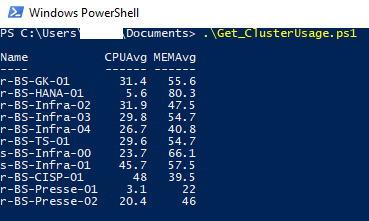
Here is a picture of the expected output: