VVF 9.0 Supervisor with the Foundation Load Balancer
The 9.0 release of VMware vSphere Foundation brings new ways to deploy the vSphere Supervisor. One of them is the built-in Foundation Load Balancer.

The 9.0 release of VMware vSphere Foundation brings new ways to deploy the vSphere Supervisor. One of them is the built-in Foundation Load Balancer (FLB), which can be set up automatically while the Supervisor is being installed.
A look back
By way of a reminder: the vSphere Supervisor lets you deploy Kubernetes clusters directly on an existing vSphere cluster and run Kubernetes services in the environment you already have. Until now there were three ways to handle load balancing for the Supervisor cluster and the Kubernetes clusters underneath it:
- NSX integration and the NSX native load balancer
- VMware AVI Load Balancer
- HA Proxy (unsupported, PoC and lab only)
Until now, the licence for vSphere Kubernetes Service (VKS, formerly vSphere with Tanzu) included a licence for AVI Load Balancer Essentials. With it you could create L4 load balancer services, used both for the Supervisor and for the Kubernetes services. That offering is deprecated with VVF and VCF 9.0 and is no longer being developed. In version terms that means AVI 30.x can no longer be installed with the Essentials edition and is only available at extra cost. This is where the new Foundation Load Balancer comes in.
The Foundation Load Balancer
With VVF 9.0 these load balancer options are available:
- VMware AVI Load Balancer (additional licence)
- Foundation Load Balancer
- HA Proxy (unsupported, PoC and lab only, deprecated)
VCF 9.0 adds these:
- NSX VPC networking
- NSX segment networking
- NSX networking with AVI load balancing
The FLB is built into VCF and VVF and is installed directly as VMs in the Supervisor’s resource pool. Unlike the AVI Load Balancer it needs no manual configuration; it is configured and set up straight from the Supervisor deployment wizard.
Topology
The FLB can be set up in two topologies, one-arm or two-arm.
One-arm topology
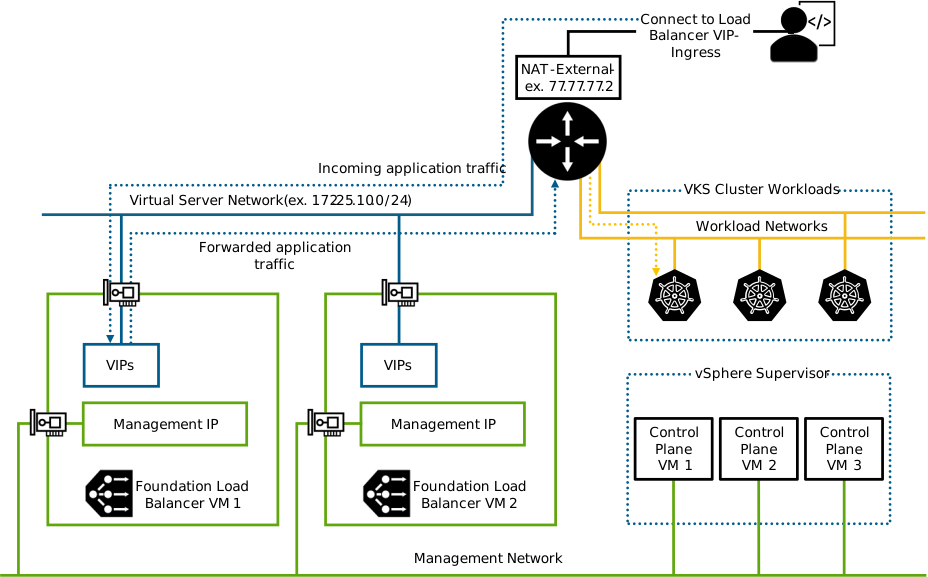
In this topology the load balancer gets two vNICs. One for management traffic, which carries the CRUD (create, read, update, delete) operations. The second is used for virtual servers and for application traffic. That puts the VIPs on the same network as the IP pools used by the applications on the Kubernetes clusters. It is the simpler setup from a networking point of view, but it offers no network segmentation.
Two-arm topology
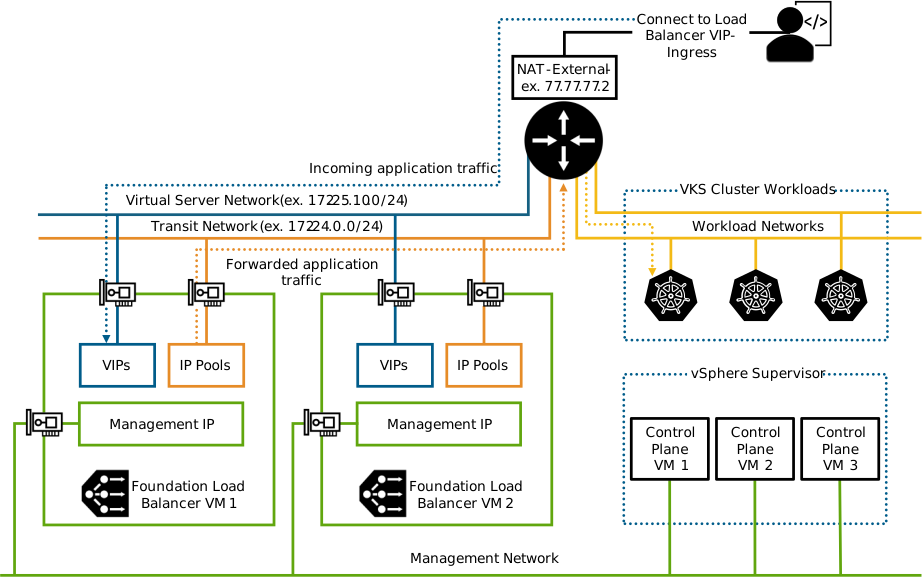
In this topology three vNICs are created. As before, one carries management traffic. The virtual server network, where the VIPs sit, gets its own vNIC. A third vNIC provides a transit network that forwards traffic to the workload networks of the Kubernetes clusters. That allows these networks to be segmented properly.
The networks and IP pools are defined while the Supervisor is being installed and configured on the load balancer automatically.
Conclusion
The new load balancer option in VVF 9.0 makes deploying the Supervisor easier, because there is no external load balancer left to configure. If you have questions or want to try the Supervisor on your own platform, we are here for you.