Integrating Antrea into NSX
Registering a Kubernetes cluster running Antrea with the NSX management and central control plane, so groups, policies and trace flows are managed in one place.

I have implemented VMware NSX as an SDN and security solution on a good number of projects. Over recent years I have also worked on integration projects for enterprise container platforms that use the NSX Container Plugin (NCP) as their container network interface (CNI). On vSphere with Tanzu projects in particular, both NCP and the Antrea CNI show up a great deal.
Because the two CNIs cover similar ground, it makes sense to centralise the overlapping functions and manage them consistently. VMware NSX gives you one place to manage and orchestrate network and security automation, for the infrastructure and for the container platform.
The VMware Container Networking with Antrea solution includes, among other things, the NSX Interworking Adapter, which lets me register my Kubernetes clusters with the NSX management plane (MP) and central control plane (CCP). That brings additional functions in the NSX Manager:
- Antrea Kubernetes resources (pods, namespaces, services and so on) shown in the NSX UI.
- Central management of groups and security policies in the NSX UI, referring to actual Kubernetes resources.
- Trace flow extended to pod and CNI data flows, for central monitoring and analysis.
- Integration of Kubernetes clusters where Antrea is the primary or the secondary CNI.
Integrating a Kubernetes cluster running Antrea into the NSX CCP/MP is straightforward:
- Preparation
- Establish the current Antrea OSS version
- Download the configuration files (YAML)
- Adjust the configuration files and generate the bootstrap configuration
- Deploy the NSX Interworking Adapter
Preparation
The examples below were done on a vSphere with Tanzu (vSphere 8.0 Update 2) cluster, using a Tanzu Kubernetes guest cluster with Tanzu Kubernetes Release (TKR) 1.26.13 based on Photon OS.
Establishing the current Antrea OSS version
First, establish which open source software (OSS) version of the Antrea CNI is in use on the target Kubernetes cluster. There are two usual ways.
Option: vSphere with Tanzu
Switch to the context of the vSphere namespace the Tanzu Kubernetes cluster (TKC) lives in.
# Change into respective vSphere Namespace where TKC is located
kubectl config use-context VSPHERE_NAMESPACE

# Check the assocaited Antrea package of the respective TKC
kubectl get antreaconfigs.cni.tanzu.vmware.com CLUSTER_NAME-antrea-package \
--output yaml | grep antrea.tanzu.vmware.com

# Sample output from an antrea-package
apiVersion: cni.tanzu.vmware.com/v1alpha1
kind: AntreaConfig
  metadata:
    labels:
      tkg.tanzu.vmware.com/package-name: antrea.tanzu.vmware.com.1.11.3---vmware.2-tkg.2-advanced
Option: locally on the Kubernetes cluster
On the local Kubernetes cluster, the TKC in my case, you can use kubectl exec to get into the Antrea controller pod and run antctl.
kubectl -n kube-system exec antrea-controller-8589557c86-wprxn --stdin --tty -- antctl version
antctlVersion: v1.11.3-79e45ea
controllerVersion: v1.11.3-79e45ea
With the OSS version established, download the matching VMware Container Networking with Antrea software bundle. A short overview of the current releases:
| VMware Container Networking version | Based on Antrea OSS version | Compatible with Antrea-NSX Interworking version |
|---|---|---|
| 1.9.0 (release notes) | 1.15.0 | 0.15.0_vmware.1 |
| 1.8.0 (release notes) | 1.13.1 | 0.13.0_vmware.1 |
| 1.7.0 (release notes) | 1.11.1 | 0.11.0 |
In our case, OSS version 1.11.3 means VMware Container Networking with Antrea version 1.7.0, which according to the release notes is compatible with Antrea interworking image version 0.11.2_vmware.1:
Antrea-NSX images:
- projects.registry.vmware.com/antreainterworking/interworking-debian:0.11.0, 0.11.1, 0.11.2_vmware.1
- projects.registry.vmware.com/antreainterworking/interworking-ubuntu:0.11.0, 0.11.1
- projects.registry.vmware.com/antreainterworking/interworking-photon:0.11.0, 0.11.1, 0.11.2_vmware.1
- projects.registry.vmware.com/antreainterworking/interworking-ubi:0.11.0, 0.11.1
VMware Container Networking with Antrea 1.7.0 introduced the antreansxctl CLI tool. It keeps being developed, and new functions and improvements arrive with the next VMware Container Networking with Antrea release. In 1.7.0 the tool is still limited and has no bootstrap option, for instance. That option is enormously helpful and simplifies the integration considerably, so I downloaded the 1.8.0 bundle and extracted the antreansxctl CLI tool from it.
Downloading the configuration files (YAML)
The VMware Container Networking with Antrea bundle comes from the VMware Customer Connect portal.
Several bundles are listed, and there is a specific one for Antrea-NSX interworking: VMware Container Networking with Antrea, NSX Interworking Adapter Image and Deployment Manifests
The zip file should be named antrea-interworking-
As mentioned, I downloaded both 1.7.0 and 1.8.0, so I could take the newer antreansxctl CLI tool out of 1.8.0 and replace the one in 1.7.0 with it. Then I recompressed the 1.7.0 bundle and uploaded it to my jump host.
Adjusting the configuration files and generating the bootstrap configuration
Once the zip file is there, unpack it:
# Extract the antrea-networking ZIP file
unzip antrea-interworking-0.11.0.zip
Archive: antrea-interworking-0.11.0.zip
creating: antrea-interworking-0.11.0/
creating: antrea-interworking-0.11.0/bin/
inflating: antrea-interworking-0.11.0/bin/antreansxctl.tar.gz
inflating: antrea-interworking-0.11.0/bootstrap-config.yaml
inflating: antrea-interworking-0.11.0/deregisterjob.yaml
inflating: antrea-interworking-0.11.0/interworking-debian-0.11.0.tar
inflating: antrea-interworking-0.11.0/interworking.yaml
inflating: antrea-interworking-0.11.0/inventorycleanup.yaml
inflating: antrea-interworking-0.11.0/ns-label-webhook.yaml

# Extract the antreansxctl CLI tool from the GZ file
tar -xzf antrea-interworking-0.11.0/bin/antreansxctl.tar.gz

# Move the antreansxctl binary to the local bin store to make it available for runtime execution
sudo mv antreansxctl /usr/local/bin
With all the files and binaries in place, two files need a small change: interworking.yaml and deregisterjob.yaml, the latter being needed if you want to remove the integration. For the required images to download from the right registry, the image URI parameters have to be adjusted. In my case I pull the images from the official VMware registry:
projects.registry.vmware.com/antreainterworking/interworking-debian:VERSION
projects.registry.vmware.com/antreainterworking/interworking-ubuntu:VERSION
projects.registry.vmware.com/antreainterworking/interworking-photon:VERSION
projects.registry.vmware.com/antreainterworking/interworking-ubi:VERSION
Because I use Photon OS as the base OS of my TKC, I have to change every image URI reference in interworking.yaml and deregisterjob.yaml:
# Replace the field after "image: vmware.io/antrea/interworking:0.11.0" with "image: projects.registry.vmware.com/antreainterworking/interworking-photon:0.11.2_vmware.1" in interworking.yaml and deregisterjob.yaml
sed -i 's|image: vmware.io/antrea/interworking:0.11.0|image: projects.registry.vmware.com/antreainterworking/interworking-photon:0.11.2_vmware.1|' antrea-interworking-0.11.0/interworking.yaml antrea-interworking-0.11.0/deregisterjob.yaml
Careful: in the interworking.yaml of the VMware Container Networking with Antrea 1.7.0 bundle, the pod security annotation for the vmware-system-antrea namespace was not adjusted. That produces various warnings and the register job cannot complete.
As a workaround in 1.7.0, add the following to interworking.yaml:
---
apiVersion: v1
kind: Namespace
metadata:
  name: vmware-system-antrea
  labels:
    app: antrea-interworking
    openshift.io/run-level: '0'
    pod-security.kubernetes.io/enforce: privileged
    pod-security.kubernetes.io/enforce-version: latest
    pod-security.kubernetes.io/audit: privileged
    pod-security.kubernetes.io/audit-version: latest
    pod-security.kubernetes.io/warn: privileged
    pod-security.kubernetes.io/warn-version: latest
---
Alternatively, wait about 10 minutes for the kapp-controller to step in and add the annotations to the namespace itself.
The antreansxctl CLI tool now creates the bootstrap config file and registers the NSX principal identity (PI) user, including a self-signed certificate, in the NSX Manager:
antreansxctl bootstrap --cluster-name shared-tkc01 --nsx-managers 10.24.0.50 --user admin --password 'VMware1!VMware1!'
bootstrap.go:51] "bootStrap" User="admin" ClusterName="shared-tkc01"
cluster.go:260] Configure NSX client for manager IP 10.24.0.50
cluster.go:119] Selected endpoint index: 0, ip: 10.24.0.50
bootstrap.go:97] "Checking PrincipalIdentities in NSX" clusterName="shared-tkc01" Result=false
bootstrap.go:113] "Creating self signed cert" clusterName="shared-tkc01"
bootstrap.go:187] "Creating PrincipalIdentities in NSX" clusterName="shared-tkc01" vpc=""
bootstrap.go:205] "vpc argument is empty, creating enterprise admin PI"
bootstrap.go:225] "Creating principal identity" ClusterName="shared-tkc01"
bootstrap.go:233] "Created principal identity" user="shared-tkc01" vpc="" key="shared-tkc01.key" cert="shared-tkc01.crt" PrincipalIdentity={[...]}
bootstrap.go:235] "role: enterprise_admin on /"
bootstrap.go:275] "Creating bootstrap Configmap and Secret yaml file" clusterName="shared-tkc01" nsxManagers=["10.24.0.50"] vpc=""
bootstrap.go:278] "Created bootstrap Configmap and Secret yaml file" bootstrapYamlFile="shared-tkc01-bootstrap-config.yaml"
That should leave you with these files:
- shared-tkc01-bootstrap-config.yaml
- shared-tkc01.crt
- shared-tkc01.key
An NSX API call verifies quickly whether the PI user was created:
curl -k -u 'admin:VMware1!VMware1!' \
--request GET 'https://10.24.0.50/api/v1/trust-management/principal-identities/' | grep -i '"name" : "shared-tkc01"' -A 22 -B 1
[…]
"results" : [ {
"name" : "shared-tkc01",
"node_id" : "shared-tkc01",
"role" : "enterprise_admin",
"certificate_id" : "0041f40a-4f52-4718-947d-3c57f7f98806",
"roles_for_paths" : [ {
"path" : "/",
"roles" : [ {
"role" : "enterprise_admin"
} ],
"delete_path" : false
} ],
"is_protected" : true,
"resource_type" : "PrincipalIdentity",
"id" : "03b51c9f-8bda-419d-8a26-9740895e82db",
"display_name" : "shared-tkc01@shared-tkc01",
"_create_time" : 1713260925476,
"_create_user" : "admin",
"_last_modified_time" : 1713260925476,
"_last_modified_user" : "admin",
"_system_owned" : false,
"_protection" : "NOT_PROTECTED",
"_revision" : 0
}, {
Deploying the NSX Interworking Adapter
These files are needed for the installation:
- shared-tkc01-bootstrap-config.yaml
- antrea-interworking-0.11.0/interworking.yaml
It matters that bootstrap-config.yaml is applied first and interworking.yaml second.
Then the deployment runs through kubectl:
kubectl apply -f shared-tkc01-bootstrap-config.yaml -f antrea-interworking-0.11.0/interworking.yaml
namespace/vmware-system-antrea created
configmap/bootstrap-config created
secret/nsx-cert created
customresourcedefinition.apiextensions.k8s.io/antreaccpadapterinfos.clusterinformation.antrea-interworking.tanzu.vmware.com created
customresourcedefinition.apiextensions.k8s.io/antreampadapterinfos.clusterinformation.antrea-interworking.tanzu.vmware.com created
namespace/vmware-system-antrea configured
configmap/cluster-id created
configmap/antrea-interworking-config created
serviceaccount/register created
role.rbac.authorization.k8s.io/register created
rolebinding.rbac.authorization.k8s.io/register created
role.rbac.authorization.k8s.io/vmware-system-antrea-register created
rolebinding.rbac.authorization.k8s.io/vmware-system-antrea-register created
serviceaccount/interworking created
clusterrole.rbac.authorization.k8s.io/antrea-interworking created
clusterrolebinding.rbac.authorization.k8s.io/antrea-interworking created
clusterrole.rbac.authorization.k8s.io/antrea-interworking-supportbundle created
clusterrolebinding.rbac.authorization.k8s.io/antrea-interworking-supportbundle created
job.batch/register created
deployment.apps/interworking created
On a successful deployment, the new namespace vmware-system-antrea should exist and hold the interworking pod:
kubectl -n vmware-system-antrea get all
NAME READY STATUS RESTARTS AGE
pod/interworking-579ff578f7-ng48n 4/4 Running 0 45s
pod/register-v5qrg 0/1 Completed 0 46s

NAME READY UP-TO-DATE AVAILABLE AGE
deployment.apps/interworking 1/1 1 1 46s

NAME DESIRED CURRENT READY AGE
replicaset.apps/interworking-579ff578f7 1 1 1 45s

NAME COMPLETIONS DURATION AGE
job.batch/register 1/1 7s 46s
The status of the integration can then be verified in the NSX UI:
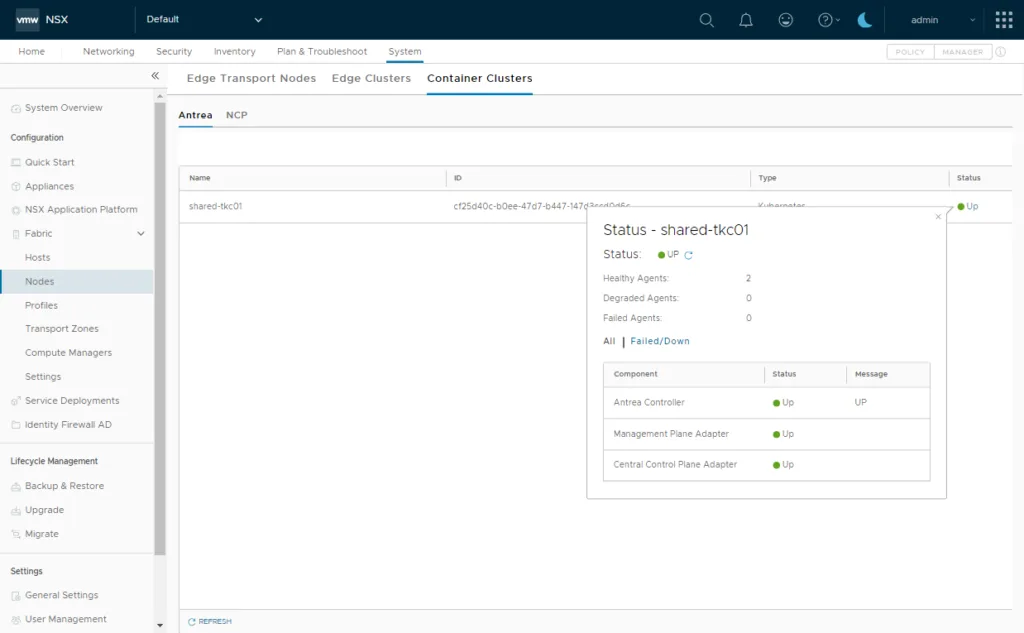
From this point the Kubernetes cluster is registered with the NSX CCP/MP and can be used, for example, to create network policies from the NSX UI.